Traditional AdTech is Dead. Long Live AdTech For AI

The rebirth of advertisements and AdTech in the age of AI

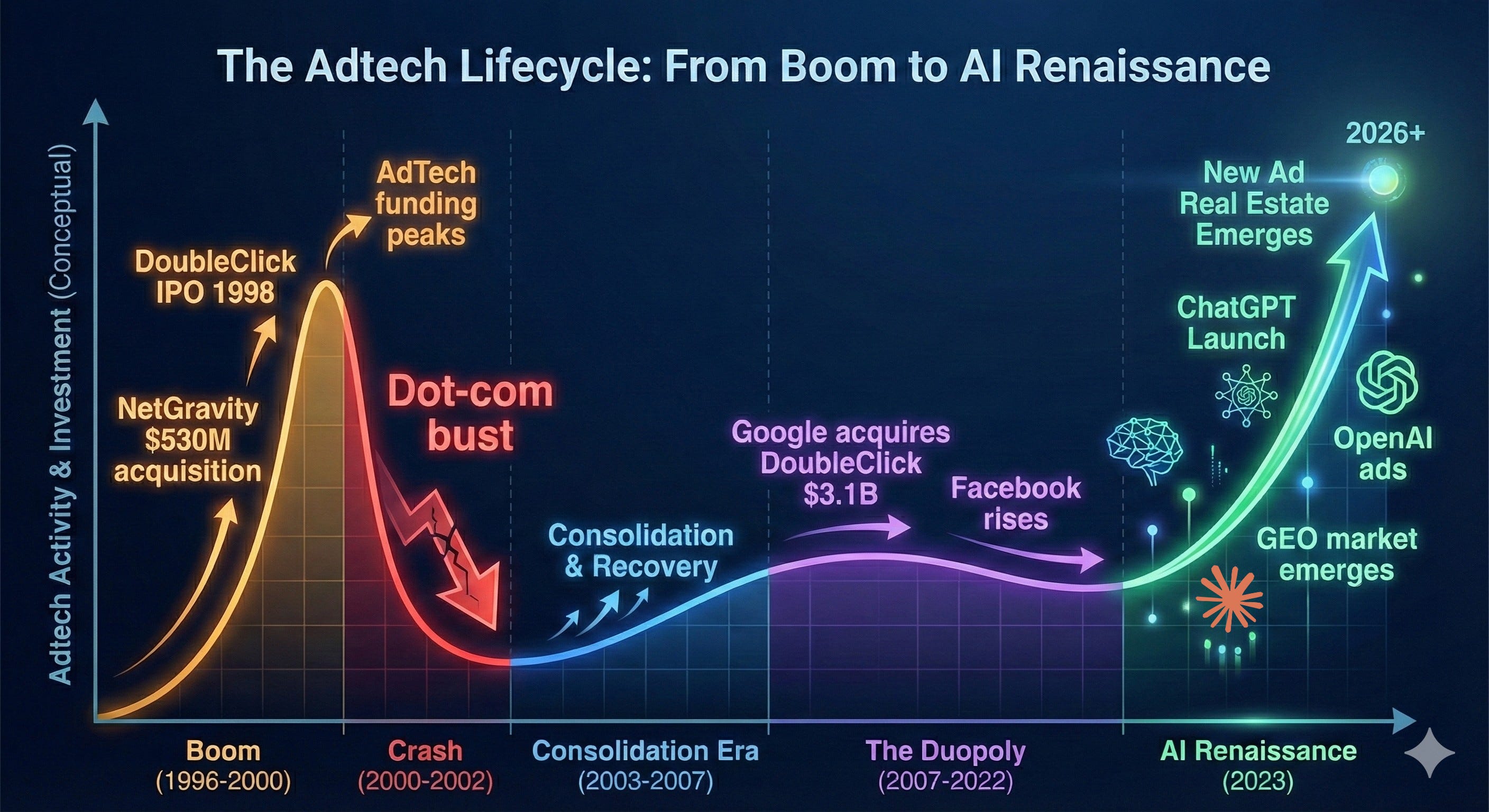
AdTech used to matter. In the early 2000s, it was one of the hottest areas in tech – hundreds of startups, billions in VC funding, genuine innovation in targeting and formats. Then Google bought DoubleClick in 2007 for $3.1 billion, Facebook launched its ad platform, and the game was over. The duopoly that emerged didn’t just dominate—at their peak, Google and Meta controlled nearly 80% of U.S. digital ad growth. Everyone else was left fighting for scraps. For the past 15 years, „AdTech startup“ became practically an oxymoron as the industry consolidated into irrelevance.

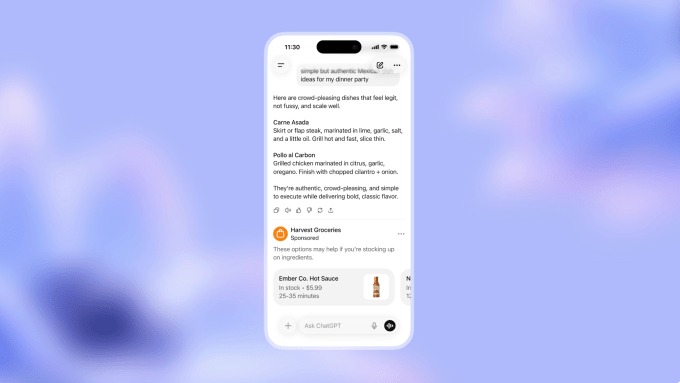
But now, in the age of AI, we are starting to see a resurgence of advertising as a booming revenue source for companies. OpenAI announced last week that they would be testing ads in ChatGPT in a “bid to boost revenue”, and the healthcare AI startup OpenEvidence recently surpassed $100M annualized run-rate revenue (and doubled their valuation to $12B!), largely on an ad-supported revenue model. And around this, the market for AI tools in advertising optimization is growing quickly.

So why are we seeing such a sharp resurgence in a field that just a few years ago was essentially dead?

Three fundamental shifts are driving this renaissance:

First, AI platforms have created the first genuinely new advertising surface since social media. ChatGPT’s 800+ million weekly active users and Claude’s ~20 million monthly active users represent massive, engaged audiences that didn’t exist two years ago. Unlike the incremental improvements of the past decade – slightly better targeting, marginally improved attribution – these platforms represent entirely new real estate where the old duopoly rules don’t apply.

Second, intent signals are dramatically more sharply defined than anything we’ve seen before. When someone types “best CRM for startups” into Google, you get a decent intent signal. But when someone has a 20-message conversation with ChatGPT about their specific sales team structure, pain points, budget constraints, and technical requirements? That’s intent data at a resolution advertisers have only dreamed about. The conversational nature of AI interactions creates a richness of context that search queries simply can’t match.

Third, entirely new infrastructure is required—and being built at breakneck speed. The old AdTech stack was built for display ads, search results, and social feeds. None of it works for conversational AI. How do you measure attribution when there’s no “click”? How do you bid on inventory that’s generated dynamically in response to natural language? What does “viewability” even mean in a text-based conversation? This infrastructure gap is spawning entirely new categories like Generative Engine Optimization (GEO), with dozens of startups raising millions to solve problems that didn’t exist 18 months ago.

So should we be heralding the rebirth of AdTech in the age of AI?

Let’s dig in.


AI is Creating New Real Estate for Ads

The rapid growth of foundation models with “chatbot-style interfaces” has brought forward what we believe is the first new real estate for advertisements since the emergence of social networks. Google and Meta were able to establish dominance in ad models by aggregating eyeballs; Google in search and Meta in social. (And to a lesser extent other social media platforms like Snap, Pinterest, etc.). As an advertiser, why would I place my ads anywhere other than where consumers are aggregating to get most bang for my buck?

Now in the Age of AI, consumers are no longer flocking to the traditional platforms but increasingly to places like ChatGPT (>800M WAUs) and Claude (~20M MAUs). And these consumers are not just making simple search queries but having full-blown conversations on every topic under the sun. This is an advertiser’s dream: a wide-scale canvas with rich, user-generated intent. And advertisers are no longer limited to traditional search displays with sponsored results but can embed more natural advertisements within AI-generated responses. While the consumer may not love this (more on that below), it certainly makes sense for the advertisers.

Beyond consumer-facing platforms, AI development tools are creating a quieter but equally significant advertising opportunity. When developers use tools like Lovable, Replit, or Cursor to build applications, these platforms make dozens of architectural decisions on their behalf—which database to use, where to host, which payment processor to integrate.

Each of these decisions represents potential advertising inventory. Supabase could sponsor recommendations in database selection flows. Vercel could appear as a ‘suggested deployment option’ when a developer’s app is ready to ship. Stripe could surface contextual offers when payment processing code is being written.

The key difference from traditional developer advertising (think Stack Overflow banner ads) is that these aren’t interruptions—they’re recommendations at the exact moment of intent. A developer isn’t being shown a database ad while reading about React hooks; they’re being offered database options precisely when their AI agent is about to scaffold database code. The conversion potential is orders of magnitude higher.

Vertical AI Is Creating Specialized Inventory

It’s not just the large model providers themselves that are benefiting from ads.

The rise of vertical AI providers is creating a new, specialized inventory for high-intent, high-value ads. Verticals like healthcare, legal, finance, real estate, and other professional services are becoming the new adtech frontier, offering advertisers direct access to high-value audiences outside the Google-Meta duopoly for the first time in over a decade.

One great example here is OpenEvidence, which has quickly grown into the leading “AI-powered medical search engine” for clinicians. The company recently said that 40% of physicians across the US across 10K hospitals and medical centers now use OpenEvidence on a daily basis. What else is interesting and unique is its business model: OpenEvidence is free to use for verified medical professionals, and generates revenue largely through advertising.

Per a great business breakdown from Contrary Research:

Given that pharmaceutical companies spent approximately $20 billion annually on marketing to healthcare professionals in the US as of 2019, capturing a portion of this market through digital channels could generate substantial revenue for the company. OpenEvidence’s advertising focus on contextual advertising and sponsored content while maintaining trust. For example, if a doctor submits a query about diabetes treatments, a sponsored summary from a pharmaceutical manufacturer may appear, or a banner for relevant clinical webinars could be displayed.

This advertising model has allowed OpenEvidence to reach >$100M annualized run-rate revenue in just a few short years.

We believe that other vertical AI tools will also embed this type of model, giving away the product to end users for free while generating revenue from charging advertisers. In vertical AI, the intent signals are clearer than ever—and unlike the generic search box, users are getting AI agents that actually solve their specific problems, creating a sustainable value exchange that justifies the ad-supported model.

Measurement Primitives are Changing and New Infrastructure is Emerging

Attribution in AI-native experiences is fundamentally different. The old AdTech stack was built for discrete surfaces where ads could be served, clicked, and tracked, but in conversational and agentic interfaces, there’s often no obvious “ad slot” and no click at all. Instead, influence is embedded inside multi-turn workflows: what the model recommends, what the user accepts, and what gets generated.

In next-gen AI apps, advertising is moving into the flow of work. When a developer scaffolds an app in Cursor, Lovable, or Vercel, the inventory isn’t a banner but it’s the moment an agent suggests a database, auth provider, or cloud service. In vertical AI tools, the same pattern holds: the “ad” looks like a contextual recommendation for a pharmaceutical brand, clinical resource, or specialized service. These touchpoints are integrated into the utility itself.

This shift is spawning an entirely new measurement rail. If clicks disappear, the new primitives become telemetry and adoption: logging multi-turn conversations, mapping model outputs to downstream actions, and tracking “acceptance events” like tab-to-insert, install, purchase, or integration. And because influence in a conversation is cumulative, the real challenge isn’t just attribution but it’s incrementality: did the recommendation actually change what the user would have done otherwise?

As a result of this shift, we are starting to see new ad networks emerge to serve these “in-flow” moments.

  • On the measurement side, companies like Profound and Bluefish are building the GEO observability layer, tracking share-of-response, competitive displacement, and brand presence across models.
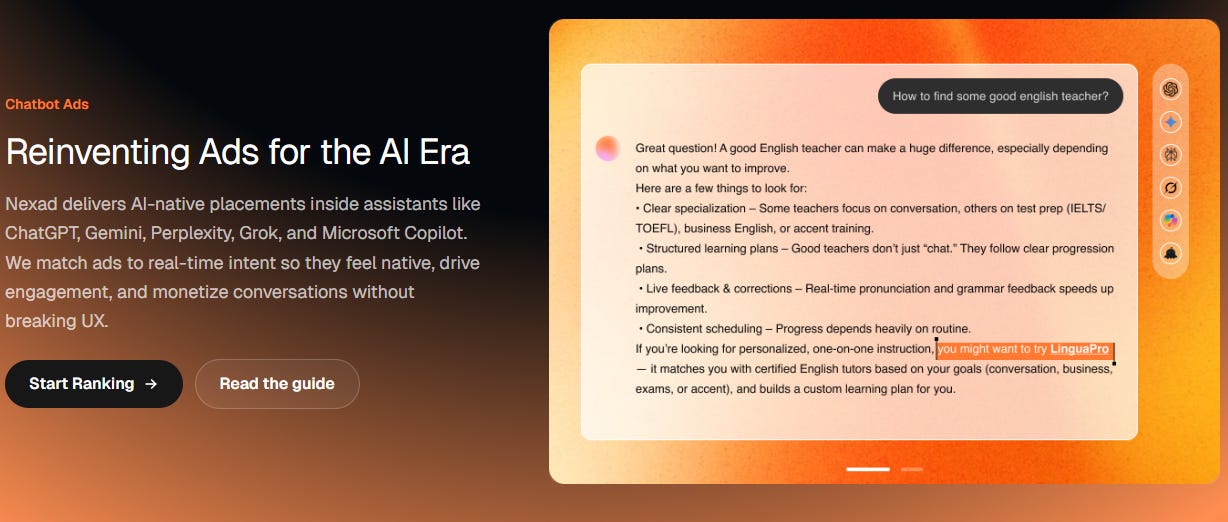
  • On the distribution side, a new generation of AI-native ad platforms is forming across multiple surfaces: platforms like ZeroClick, OpenAds, and Nex.ad are beginning to monetize dynamic, contextually relevant recommendations inside or alongside AI conversations, while publisher-centric AI engagement platforms like Linotype.ai help site owners retain users and surface native monetization opportunities.

But unlike the old web, the “auction” can’t just pick the highest bidder. It has to operate inside generation loops, ranking units based on contextual relevance, quality, and bid while navigating trust and policy constraints in sensitive domains like healthcare and legal. Pricing models may shift as well, away from CPM/CPC and toward outcomes like cost-per-accept, cost-per-embed, or cost-per-adoption.

The biggest wildcard is walled gardens. If OpenAI, Anthropic, Google, and vertical copilots control the interface, they may also control the inventory and measurement rails, turning AI advertising into a handful of closed ecosystems rather than an open programmatic market. Time will tell!

Nexad.ai Reinventing Ads for the AI Era

Conclusion / Challenges

There’s one clear challenge in all of this: people generally dislike advertisements. A recent report found that 81% of young people hate ads, and 60% find them intrusive. And who’s to blame them? Most people find ads annoying and not beneficial to them, and now nearly half the internet uses an ad blocker.

Another key challenge is whether people will feel that the answers they are served by the LLMs are influenced by the advertisements that appear. If I ask Claude for the best recommendations for hotels in Switzerland, will I know it showing me what the model says is “best”, or which hotel is spending the most on advertising for this query result?

But here’s the interesting part: in the same study referenced above, only 28% of respondents wanted fewer ads. Which suggests that its not the brands or products being peddled they dislike, but how the ads are actually served.

This could actually be a boon to the new platforms like OpenAI and Anthropic, as well as the emerging AI Adtech tools. By finding creative, non-intrusive, intent-based, transparent, and beneficial ways to reach consumers, a new form of advertising could actually flourish.

So we’re left with the thought…

“Traditional AdTech is Dead…Long Live AdTech For AI“.

Source: https://aspiringforintelligence.substack.com/p/traditional-adtech-is-dead-long-live

The Death of Software 2.0

The age of PDF is over. The time of markdown has begun. Why Memory Hierarchies are the best analogy for how software must change. And why Software it’s unlikely to command the most value.

When I last wrote about software, I received significant pushback. Today, I believe that Claude Code is confirming the original case I had all along. Software is going to become an output of hardware and an extension of current hardware designs. With this in mind, I want to write today about how I see software changing from here.

But let’s start with one core conviction. Claude Code is the glimpse of the future. Assuming it improves, has harnesses, and can continue to scale large context windows and only become marginally more intelligent, I believe this is enough to really take us to the next state of AI. I cannot stress enough that Claude Code is the ChatGPT moment repeated. You must try it to understand.

One day, the successor to Claude Code will make a superhuman interface available to everyone. And if Tokens were TCP/IP, Claude Code is the first genuine website built in the age of AI. And this is going to hurt a large part of the software industry.

Software (Especially Seat Based) is in for a Much Rougher Ride

The environment may be rough at OpenAI, but at a traditional SaaS company, there is likely no greater whiplash than SaaS is eating the world in 2012 to Saas is screwed today. The stocks reflect it; multiple compression in the companies has been painful and will persist.

Source: EODHD

This is structural. I believe it’s time to rethink software’s value proposition, and I have what I consider the best analogy for what the future holds. Afterwards, we will digest what Software will look like as an extension of computing, because I believe that Claude Code resembles the memory hierarchy in computing. Let’s explain.

The New Model of Software

Claude Code (and subsequent innovations) clearly will change a lot about software, but the typical (and right) pushback is that you cannot use “non-deterministic software” for defined business practices. However, there is a persistent design pattern in hardware that addresses this difference: the memory hierarchy. No one can rely on anything in a computer’s non-persistent memory, yet it is one of the most valuable components of the entire stack.

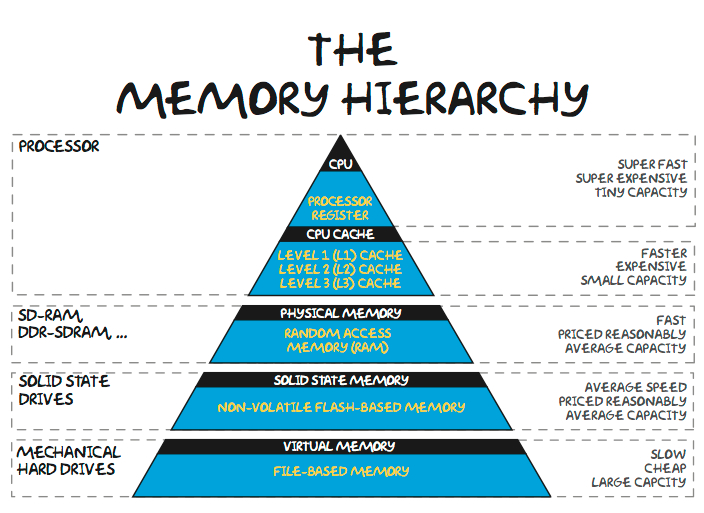
For those unfamiliar with computer science, there is a memory hierarchy that trades capacity and persistence for speed, and the system works because there are handoffs between levels. In the traditional stack, SRAM sits at the top; overflow is to DRAM, which is non-persistent (if you turn it off, it goes away), and then to NAND, which is persistent (if you turn it off, it persists).

I don’t think it’s worth matching the hierarchy too closely, but I believe that Claude Code and Agent Next will be the non-persistent memory stack in the compute stack. Claude Code is DRAM.

Memory Hierarchy
Source: https://computerscience.chemeketa.edu/cs160Reader/ComputerArchitecture/MemoryHeirarchy.html

I believe that AI and software will be an extension of this, and we can already identify which layers correspond to which. The “CPU” in the hierarchy comprises raw information, and the fast memory in the hierarchy corresponds to the context window. This level of context is very fast information, not persistent, and gets cleared systematically. The output of work performed in non-persistent memory is passed to the NAND, which is stored for the long term.

Now that the code is merely an output of hardware, I believe this analogy applies.

AI Agents and their context windows are going to be the new “fast memory”, and I believe that infrastructure software is going to look a lot closer to persistent memory. It will have high value, structured output, and will be accessed and transformed at a much slower rate. I believe the way to think of software, and the “software of the future,” looks a lot more like NAND, and that is persistent, accurate, and information that needs to be stored. In software parlance, it will be the “single source of truth” that AI agents will interact with and manipulate information from.

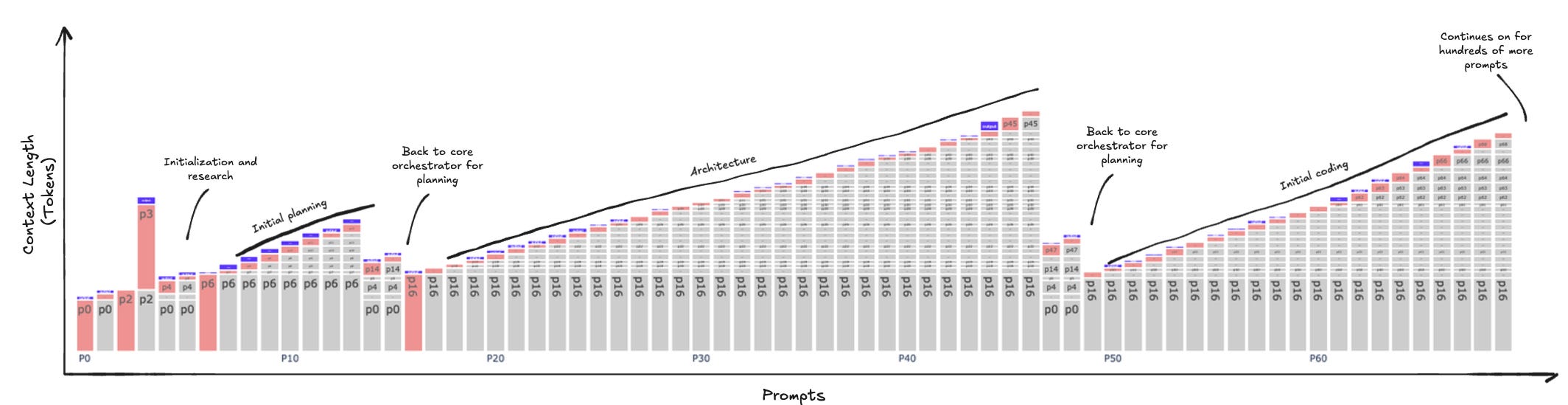
If you’re so visually inclined, here’s a diagram of a Claude code context window being compacted over and over. Another way to think about this is that it is an identity for a compute cycle; once the task is finished, it is transferred to slower memory and continues.

Source: Weka

Each time an AI agent’s computation cycle occurs, this is a scratchpad. Each context window is a clock cycle: cached state accumulates until the cache is flushed, after which information is processed. Afterward, the entire context is discarded, leaving only the output. Computation is ephemeral, and information processing by a higher tier of computation largely abstracts away most of human reasoning.

Importantly, I think there is a world in which software doesn’t go away, but its role must change. In this analogy, data, state, and APIs will be persistent storage, akin to NAND, whereas human-oriented consumption software will likely become obsolete. All horizontal software companies oriented at human-based consumption are obsolete. The entire model will be focused on fast information processors (AI Agents), using tokens to transform them and depositing the answers back into memory. Software itself must change to support this core mechanism, as the compute engine at the top of the hierarchy is primarily nonhuman, namely an AI agent.

I believe that next-generation software companies must completely shift their business models to prepare for an AI-driven future of consumption; otherwise, they will be left behind.

Glimpses of the Future

So what does this future look like? I believe that all software must leave information work as soon as possible. I believe that the future role of software will not have much “information processing”, i.e., analysis. Claude Code or Agent-Next will be doing the information synthesis, the GUI, and the workflow. That will be ephemeral and generated for the use at hand. Anyone should be able to access the information they want in the format they want and reference the underlying data.

What I’m trying to say is that the traditional differentiation metrics will change. Faster workflows, better UIs, and smoother integrations will all become worthless, while persistent information, a la an API, will become extremely valuable. Software and infrastructure software will become the “NAND” portion of the memory hierarchy.

And since I’m going to be heavily relying on the history of memory, the last time a new competitive technology came out, it was an extinction event for the magnetic cores that DRAM replaced, and I think this is probably going to be the case for UI companies or companies like Tableau or other visualization software. Zapier / Make as connectors, UiPath, or RPA companies, etc. These are all facing an extinction-level event.

Other companies that I think could be significantly affected include Notion and Airtable. Monday, Asana, and Smartsheet are merely UIs for tasks; why should they exist? Figma could be significantly disrupted if UIs, as a concept humans create for other humans, were to disappear.

Companies that are interesting are “sources of truth,” but many of them need to change. An example might even be Salesforce, a SaaS company. I don’t think the UI is that great, and most of the custom projects are just hardening workflows in the CRM. For Salesforce to make the leap, it needs to focus its product on being consumed by an AI agent, with manipulation and maintenance, while being the best possible NAND in this stack. The problem is that Salesforce will want to try to go up the stack, and by doing so, maybe miss the shift completely.

Most SaaS companies today need to shift their business models to more closely resemble API-based models to align with the memory hierarchy of the future of software. Data’s safekeeping and longer-term storage are largely the role of software companies now, and they must learn to look much more like infrastructure software to be consumed by AI Agents. I believe that is what’s next.

This raises the question: what does this look like for the industry as a whole in the near future? I believe the next 3-5 years will be a catastrophic sea change.

Source: https://www.fabricatedknowledge.com/p/the-death-of-software-20-a-better

Claude Code: If you’re still typing instructions into Claude Code like you’re asking ChatGPT for help, you’re missing the entire point

Source: https://diamantai.substack.com/p/youre-using-claude-code-wrong-and

If you’re still typing instructions into Claude Code like you’re asking ChatGPT for help, you’re missing the entire point. This isn’t another AI assistant that gives you code snippets to copy and paste. It’s a different species of tool entirely, and most developers are using maybe 20% of what it can actually do.

Think of it this way: you wouldn’t use a smartphone just to make phone calls, right? Yet that’s exactly what most people do with Claude Code. They treat it like a glorified autocomplete engine when it’s actually a complete development partner that lives in your terminal, understands your entire codebase, and can handle everything from architecture decisions to writing documentation.

The gap between casual users and power users isn’t about technical knowledge. It’s about understanding the workflow, knowing when to intervene, and setting up your environment so Claude delivers production-quality results consistently. This guide will show you how to cross that gap.

Your Development Partner Lives in the Terminal

Picture working with a senior developer who never gets tired, can read thousands of files in seconds, and has instant access to the entire internet. That’s Claude Code. It connects Anthropic’s AI models directly to your project through the command line. You describe what you need in plain language, and it plans solutions, writes across multiple files, runs tests, and implements features.

But here’s what makes it different from every other coding tool: it actually understands context. Not just syntax highlighting or function signatures. Real context. It reads your project structure, sees your existing patterns, runs your tools, and even fetches information from external sources when needed.

The catch is this: giving it instructions is a skill. A learnable skill, but a skill nonetheless. The difference between getting mediocre results and getting genuinely useful code comes down to how you communicate and how you structure your workflow.

The One Rule That Changes Everything

Here’s where most people go wrong immediately: they start coding right away. It’s like walking into a contractor’s office and saying “start building my house” without showing blueprints, discussing materials, or even agreeing on what kind of house you want.

The result? You’ll get a house. It might even have walls and a roof. But it probably won’t be what you imagined.

Always start in plan mode. Before giving any instructions, press shift-tab to cycle into planning mode. Tell Claude to explore your codebase first, but specifically tell it not to write anything yet. Let it read the relevant files, understand the architecture, and grasp the bigger picture.

Once it’s explored, ask for a proposal. Not the simplest solution, not the fastest solution. Ask it to think through options starting with the most straightforward approach. Then discuss that plan like you would with a colleague. Question assumptions. Refine the approach. Push back if something seems off.

Only after you’re confident it understands the task should you tell it to start coding.

This feels slower at first. Your instinct will be to just dive in and start building. Resist that instinct. Planning five minutes saves fixing broken implementations for an hour. Every single time.

Precision Beats Brevity Every Time

Vague instructions produce vague results. Say “fix the bug” and you might get a fix, or you might get a complete rewrite that breaks three other features. There’s no middle ground here.

Instead, be surgical with your instructions. Point to specific files. Reference exact functions. Mention line numbers if you have them. Compare these two approaches:

“Fix the authentication issue.”

versus

“In the login.js file in the auth folder, update the token validation function to handle expired tokens without crashing.”

The second version leaves no room for misinterpretation. It guides Claude exactly where to look and what to do.

This precision applies to style and patterns too. If you want code that matches your existing codebase, say so explicitly. Point Claude to well-written examples in your project. It can mirror patterns beautifully, but only when you show it the pattern you want.

Think of it like directing a movie. You wouldn’t tell an actor “do something emotional.” You’d say “show hesitation, then determination, with a slight smile at the end.” Same energy here.

Your Most Powerful Tool Is the Escape Key

Claude works best as a collaborative partner, not an autonomous robot. The Escape key keeps you in control.

See Claude heading down the wrong path? Hit Escape immediately. This stops it mid-process while keeping all the context intact. You can redirect without losing the work already done. It’s like tapping someone on the shoulder mid-sentence and saying “wait, different approach.”

Double-tap Escape to jump backward through your conversation history. This lets you edit a previous prompt and explore an alternative direction. You can iterate on the same problem multiple times, trying different solutions until one clicks.

If Claude makes changes you don’t like, just tell it to undo them. It can revert files instantly. Combined with regular checkpoints, this means you can experiment fearlessly. The safety net is always there.

Understanding the Different Modes

Claude Code has multiple modes, and knowing when to use each one separates beginners from experts.

Plan mode is for thinking, not doing. Use it when starting new features or untangling complex problems. It will architect solutions without touching your files. This is your strategy phase.

Code mode is for building. Once you have a solid plan, switch to code mode and let it implement. But stay alert. Watch what it’s doing and be ready to course-correct.

Auto-accept mode removes the approval step for each change. It’s fantastic for straightforward tasks but dangerous for anything complex or important. For critical work, stay manual and review everything.

Bash mode lets you run terminal commands and feed the output directly into Claude’s context. This is debugging gold. Run your tests, capture the failures, and immediately ask Claude to fix them without copying error messages around.

Each mode has its place. The trick is recognizing which situation calls for which mode.

Managing Context Before It Manages You

Claude Code’s biggest weakness is context window limits. As sessions grow longer, it starts forgetting earlier information. Power users have strategies to handle this.

Use the /compact command regularly. It clears old execution results while keeping the important conversation history. Think of it like cleaning your desk: you keep the critical documents but toss the scrap paper.

For complex projects, create a CLAUDE.md file in your project root. This becomes permanent memory. Put your project overview, architecture decisions, coding standards, and common patterns there. Claude reads it automatically and uses it as context for every task. It’s like giving every session a primer on how your project works.

For massive tasks, use a checklist file. Create a markdown document with all the steps needed to complete the task. Tell Claude to use it as a scratchpad, checking off items as it progresses. This keeps the main conversation clean while giving Claude a progress tracker.

Divide Complex Work with Subagents

When facing a genuinely complex problem, break it apart and assign pieces to different subagents. Tell Claude to spin up a subagent for the backend API while the main agent handles the frontend. Or have one subagent research documentation while another writes implementation code.

You can even mention subagents directly with the @ symbol to guarantee they activate. You can also specify which model each subagent should use. Opus 4 handles complex planning and architecture. Haiku 3.5 knocks out simple, fast tasks.

This approach tackles problems in parallel and keeps context focused. Each subagent deals with one slice of the problem without getting overwhelmed by the full complexity. It’s like having multiple specialists working on different parts of a project simultaneously.

Show, Don’t Tell

Claude Code can interpret visual information. Drag screenshots directly into your terminal. Show it UI mockups, error messages, or architecture diagrams. It will understand the visual context and use it to guide implementation.

This is especially powerful for debugging interface issues. Instead of describing what’s wrong with your layout, just show a screenshot. For replicating designs, provide the mockup and let Claude figure out the implementation details.

Visual context often communicates more than words ever could. A single screenshot can replace three paragraphs of explanation. Use this liberally.

Automate Everything, Then Automate the Automation

Claude Code excels at repetitive tasks. But power users go further: they automate the automation itself.

Set up custom slash commands for tasks you repeat constantly. Create a command that loads your project context, runs your test suite, and generates documentation in one go.

Use hooks to trigger actions automatically. Run tests after every code change. Lint before commits. Update documentation when finishing features. These small automations compound into massive time savings.

For data processing pipelines, integrate Claude directly into your workflow. Pipe data in, let it transform or analyze the data, and pipe the output to the next step. This turns Claude into a powerful processing node in your toolchain.

Extended Thinking for Complex Problems

For genuinely difficult problems, use extended thinking commands like /think or /ultrathink. These increase Claude’s reasoning budget, giving it more time to work through complicated challenges.

Yes, it takes longer. But the quality difference is dramatic for debugging, architecture planning, and design decisions. It’s the difference between asking for a quick answer versus asking someone to really think through a problem thoroughly.

The ultrathink command is particularly powerful. It provides the maximum thinking budget, perfect for architectural decisions or bugs that have stumped you for hours. Use it sparingly, but when you need it, you really need it.

Git Workflows That Keep You Safe

Never work directly on your main branch with Claude Code. Always create a feature branch first. This gives you a safe sandbox to experiment in.

Even better, use Git worktrees. This lets you maintain multiple working directories for different branches, so you can have Claude working on several features in parallel without interference.

When Claude finishes a task, have it commit changes with a clear message explaining what was done. Then review the commit diff carefully before merging. This workflow gives you the safety of version control while letting Claude work autonomously.

Embed Your Standards in Documentation

Instead of reminding Claude about coding standards in every conversation, embed them directly in documentation files. Create a QUALITY.md file with your coding standards, testing requirements, and review checklist.

Claude will read this automatically and follow your standards without being told. It becomes part of the project context, like a senior developer who knows the house rules and follows them instinctively.

For teams, this ensures consistency across all Claude Code sessions. Everyone gets the same quality bar, regardless of who’s running the tool.

The MCP Revolution

Model Context Protocol servers extend Claude Code’s capabilities dramatically. Connect it to your Slack, Figma, Google Drive, or custom data sources. This transforms Claude from a code assistant into a genuine team member that can pull information from anywhere.

Need to check the latest design mockup? Claude fetches it from Figma. Need to understand a business requirement? It pulls it from Slack.

Set up MCP servers for your most-used tools. The initial setup takes time, but the payoff is enormous. Claude becomes infinitely more capable when it can access your actual data sources.

Debugging Strategy

Claude Code is exceptional at debugging when you give it proper information. When you hit a bug, don’t just paste the error message. Use bash mode to run your tests and feed the full output to Claude. Tell it to analyze the stack trace, read the relevant files, and propose a fix.

For intermittent bugs, run the failing code multiple times and give Claude all the outputs. It can spot patterns in failures that humans miss.

If bugs involve external services, use Claude to fetch relevant documentation or logs. It can correlate error messages with API documentation to pinpoint exactly what’s wrong.

Self-Writing Documentation

One of Claude Code’s most underrated features is documentation generation. After finishing a feature, tell Claude to update the README, API docs, and changelog. It has full context of what was just built, so it writes accurate, comprehensive documentation without requiring explanation.

This is especially powerful after refactors, where documentation typically gets forgotten. Set up a hook to automatically generate documentation after every feature merge. Your docs will stay synchronized with your code effortlessly.

Managing Token Usage in Long Sessions

Long Claude Code sessions can get expensive as context grows. Smart users manage this proactively.

Break large tasks into smaller chunks. Complete one chunk, commit it, then start a fresh session for the next chunk. This keeps context size manageable and costs reasonable.

Use prompt caching for information that doesn’t change often. Load your project overview and standards once, then reference them in subsequent sessions. This dramatically reduces token usage.

For repetitive tasks across many files, use a script to process them in batches rather than one giant session. This parallel approach is both faster and more cost-effective.

The Checklist Method for Large Migrations

For migrations, massive refactors, or fixing hundreds of lint errors, the checklist method is unbeatable.

Create a markdown file listing every task that needs completion. Tell Claude to use this as its working document, checking off items as it completes them and adding notes about any issues.

This approach does two crucial things. First, it gives Claude a clear roadmap, preventing it from getting lost in complexity. Second, it lets you track progress and see exactly what’s been done.

For truly large codebases, break the checklist into sections and tackle them in separate sessions. This keeps each session focused and productive.

Accelerating Learning and Onboarding

Claude Code is an incredible learning tool. New team members can ask it to explain the codebase, trace through execution flows, and understand architecture decisions.

Have newcomers ask Claude to map out the project structure and identify key components. Then they can ask specific questions about how things work. This accelerates onboarding from weeks to days.

For existing team members exploring unfamiliar parts of the codebase, Claude provides guided tours. Ask it to explain the authentication flow or the data pipeline, and it will trace through the code, explaining each piece clearly.

Beyond the Code

Claude Code can do much more than write software. Use it for research tasks, like reading documentation and creating summaries for future reference. It can analyze logs, process data files, and generate reports.

Need to understand a new API? Have Claude read the documentation and create a usage guide. Working with a large CSV file? Pipe it into Claude and ask for analysis.

These non-coding tasks often consume huge amounts of developer time. Claude can handle them while you focus on the creative problem-solving that actually requires human intelligence.

Avoiding Common Traps

Even experienced users make mistakes. Here are the most frequent ones and how to sidestep them.

Trusting auto-accept mode for complex tasks is dangerous. Auto-accept is convenient but risky for anything affecting core functionality. Always review changes manually for important work.

Letting sessions run too long accumulates context and makes everything slower and more expensive. Refresh your session regularly, especially after completing major milestones.

Not using version control is asking for trouble. Always use branches, and always review diffs before merging.

Being too vague leads to assumptions. Those assumptions might not match your intent. Take time to be precise.

Ignoring the plan phase might feel faster, but it leads to rework. The few minutes spent planning save hours of fixing wrong implementations.

Bosses are fighting a new battle in the RTO wars: It’s not about where you work, but when you work

For the last three years, the corporate world has been locked in a territorial dispute. The “Return to Office” (RTO) wars were defined by geography: the home versus the headquarters. But as 2025 unfolded, the frontline shifted. According to commercial real-estate giant JLL’s Workforce Preference Barometer 2025, the most critical conflict between employers and employees is no longer about location—it is about time.

While structured hybrid policies have become the norm, with 66% of global office workers reporting clear expectations on which days to attend, a new disconnect has emerged. Employees have largely accepted the “where,” but they are aggressively demanding autonomy over the “when.”

The report highlights a fundamental change in employee priorities. Work–life balance has overtaken salary as the leading priority for office workers globally, cited by 65% of respondents—up from 59% in 2022. This statistic underscores a profound shift in needs: Employees are looking for “management of time over place.”

While high salaries remain the top reason people switch jobs, the ability to control one’s schedule is the primary reason they stay. The report notes employees are seeking “agency over when and how they work,” and this desire for temporal autonomy is reshaping the talent market.

Although JLL didn’t dive into the phenomenon of “coffee badging,” its findings align with the practice of hybrid workers stretching the boundaries of office attendance. The phrase—meaning when a worker badges in just long enough to have the proverbial cup of coffee before commuting somewhere else to keep working remotely—vividly illustrates how the goalposts have shifted from where to when. Gartner reported 60% of employers were tracking employees as of 2022, twice as many as before the pandemic.

The ‘flexibility gap’

JLL’s data reveals a significant “flexibility gap”: 57% of employees believe flexible working hours would improve their quality of life, yet only 49% currently have access to this benefit.

The gap is particularly dangerous for employers, JLL said, arguing it believes the “psychological contract” between workers and employers is at risk. While salary and flexibility remain fundamental to retention, JLL said its survey of 8,700 workers across 31 countries reveals a deeper psychological contract: “Workers today want to be visible, valued and prepared for the future. Around one in three say they could leave for better career development or reskilling opportunities, while the same proportion is reevaluating the role of work in their lives.” JLL argued “recognition … emotional wellbeing and a clear sense of purpose” are now crucial for long-term retention.

The report warns that where this contract is broken, employees stop engaging and start seeking compensation through “increased commuting stipend and flexible hours.” The urgency for time flexibility is being driven by a crisis of exhaustion. Nearly 40% of global office workers report feeling overwhelmed, and burnout has become a “serious threat to employers’ operations.”

The link between rigid schedules and attrition is clear: Among employees considering quitting in the next 12 months, 57% report suffering from burnout. For caregivers and the “squeezed middle” of the workforce, standard hybrid policies are insufficient; 42% of caregivers require short-notice paid leave to manage their lives, yet they often feel their constraints are “poorly understood and supported at work.”

To survive this new battle, the report suggests companies must abandon “one-size-fits-all” approaches. Successful organizations are moving toward “tailored flexibility,” which emphasizes autonomy over working hours rather than just counting days at a desk. This shift even impacts the physical office building. To support a workforce that operates on asynchronous schedules, offices must adapt with “extended access hours,” smart lighting, and space-booking systems that support flexible work patterns rather than a rigid 9-to-5 routine.

Management guru Suzy Welch, however, warns it may be an uphill battle for employers to find a burnout cure. The New York University professor, who spent seven years as a management consultant at Bain & Co. before joining Harvard Business Review in 2001, later serving as editor-in-chief, told the Masters of Scale podcast in September burnout is existential and generational. The 66-year-old Welch argued burnout is linked to hope, and current generations have reason to lack this.

“We believed that if if you worked hard you were rewarded for it. And so this is the disconnect,” she said.

Expanding on the theme, she added: “Gen Z thinks, ‘Yeah, I watched what happened to my parents’ career and I watched what happened to my older sister’s career and they worked very hard and they still got laid off.’” JLL’s worldwide survey suggests this message has resonated for workers globally: They shouldn’t give up too much of their time, because it just may not be rewarded.

Source: https://fortune.com/2026/01/04/bosses-new-battle-remote-work-from-where-to-when-flexible-hybrid

Agentic Search and The Search Wars of 2026: ChatGPT’s Conversational Surge Challenges Google’s Decades-Long Hegemony

As of January 2, 2026, the digital landscape has reached a historic inflection point that many analysts once thought impossible. For the first time since the early 2000s, the iron grip of the traditional search engine is showing visible fractures. OpenAI’s ChatGPT Search has officially captured a staggering 17-18% of the global query market, a meteoric rise that has forced a fundamental redesign of how humans interact with the internet’s vast repository of information.

While Alphabet Inc. (NASDAQ: GOOGL) continues to lead the market with a 78-80% share, the nature of that dominance has changed. The „search war“ is no longer about who has the largest index of websites, but who can provide the most coherent, cited, and actionable answer in the shortest amount of time. This shift from „retrieval“ to „resolution“ marks the end of the „10 blue links“ era and the beginning of the age of the conversational agent.

The Technical Evolution: From Indexing to Reasoning

The architecture of ChatGPT Search in 2026 represents a radical departure from the crawler-based systems of the past. Utilizing a specialized version of the GPT-5.2 architecture, the system does not merely point users toward a destination; it synthesizes information in real-time. The core technical advancement lies in its „Citation Engine,“ which performs a multi-step verification process before presenting an answer. Unlike early generative AI models that were prone to „hallucinations,“ the current iteration of ChatGPT Search uses a retrieval-augmented generation (RAG) framework that prioritizes high-authority sources and provides clickable, inline footnotes for every claim made.

This „Resolution over Retrieval“ model has fundamentally altered user expectations. In early 2026, the technical community has lauded OpenAI’s ability to handle complex, multi-layered queries—such as „Compare the tax implications of remote work in three different EU countries for a freelance developer“—with a single, comprehensive response. Industry experts note that this differs from previous technology by moving away from keyword matching and toward semantic intent. The AI research community has specifically highlighted the model’s „Thinking“ mode, which allows the engine to pause and internally verify its reasoning path before displaying a result, significantly reducing inaccuracies.

A Market in Flux: The Duopoly of Intent

The rise of ChatGPT Search has created a strategic divide in the tech industry. While Google remains the king of transactional and navigational queries—users still turn to Google to find a local plumber or buy a specific pair of shoes—OpenAI has successfully captured the „informational“ and „creative“ segments. This has significant implications for Microsoft (NASDAQ: MSFT), which, through its deep partnership and multi-billion dollar investment in OpenAI, has seen its own search ecosystem revitalized. The 17-18% market share represents the first time a competitor has consistently held a double-digit piece of the pie in over twenty years.

For Alphabet Inc., the response has been aggressive. The recent deployment of Gemini 3 into Google Search marks a „code red“ effort to reclaim the conversational throne. Gemini 3 Flash and Gemini 3 Pro now power „AI Overviews“ that occupy the top of nearly every search result page. However, the competitive advantage currently leans toward ChatGPT in terms of deep engagement. Data from late 2025 indicates that ChatGPT Search users average a 13-minute session duration, compared to Google’s 6-minute average. This „sticky“ behavior suggests that users are not just searching; they are staying to refine, draft, and collaborate with the AI, a level of engagement that traditional search engines have struggled to replicate.

The Wider Significance: The Death of SEO as We Knew It

The broader AI landscape is currently grappling with the „Zero-Click“ reality. With over 65% of searches now being resolved directly on the search results page via AI synthesis, the traditional web economy—built on ad impressions and click-through rates—is facing an existential crisis. This has led to the birth of Generative Engine Optimization (GEO). Instead of optimizing for keywords to appear in a list of links, publishers and brands are now competing to be the cited source within an AI’s conversational answer.

This shift has raised significant concerns regarding publisher revenue and the „cannibalization“ of the open web. While OpenAI and Google have both struck licensing deals with major media conglomerates, smaller independent creators are finding it harder to drive traffic. Comparison to previous milestones, such as the shift from desktop to mobile search in the early 2010s, suggests that while the medium has changed, the underlying struggle for visibility remains. However, the 2026 search landscape is unique because the AI is no longer a middleman; it is increasingly the destination itself.

The Horizon: Agentic Search and Personalization

Looking ahead to the remainder of 2026 and into 2027, the industry is moving toward „Agentic Search.“ Experts predict that the next phase of ChatGPT Search will involve the AI not just finding information, but acting upon it. This could include the AI booking a multi-leg flight itinerary or managing a user’s calendar based on a simple conversational prompt. The challenge that remains is one of privacy and „data silos.“ As search engines become more personalized, the amount of private user data they require to function effectively increases, leading to potential regulatory hurdles in the EU and North America.

Furthermore, we expect to see the integration of multi-modal search become the standard. By the end of 2026, users will likely be able to point their AR glasses at a complex mechanical engine and ask their search agent to „show me the tutorial for fixing this specific valve,“ with the AI pulling real-time data and overlaying instructions. The competition between Gemini 3 and the GPT-5 series will likely center on which model can process these multi-modal inputs with the lowest latency and highest accuracy.

The New Standard for Digital Discovery

The start of 2026 has confirmed that the „Search Wars“ are back, and the stakes have never been higher. ChatGPT’s 17-18% market share is not just a number; it is a testament to a fundamental change in human behavior. We have moved from a world where we „Google it“ to a world where we „Ask it.“ While Google’s 80% dominance is still formidable, the deployment of Gemini 3 shows that the search giant is no longer leading by default, but is instead in a high-stakes race to adapt to an AI-first world.

The key takeaway for 2026 is the emergence of a „duopoly of intent.“ Google remains the primary tool for the physical and commercial world, while ChatGPT has become the primary tool for the intellectual and creative world. In the coming months, the industry will be watching closely to see if Gemini 3 can bridge this gap, or if ChatGPT’s deep user engagement will continue to erode Google’s once-impenetrable fortress. One thing is certain: the era of the „10 blue links“ is officially a relic of the past.

Source: https://markets.financialcontent.com/wral/article/tokenring-2026-1-2-the-search-wars-of-2026-chatgpts-conversational-surge-challenges-googles-decades-long-hegemony

The EV Battery Tech That’s Worth the Hype, According to Experts

Major battery breakthroughs seemingly happen every day, but only some of that tech ever leaves the lab. WIRED breaks down what’s actually going to change EVs and what’s just a dream.

The EV Battery Tech Thats Worth the Hype According to Experts

You’ve seen the headlines: This battery breakthrough is going to change the electric vehicle forever. And then … silence. You head to the local showroom, and the cars all kind of look and feel the same.

WIRED got annoyed about this phenomenon. So we talked to battery technology experts about what’s really going on in electric vehicle batteries. Which technologies are here? Which will be, probably, but aren’t yet, so don’t hold your breath? What’s probably not coming anytime soon?

“It’s easy to get excited about these things, because batteries are so complex,” says Pranav Jaswani, a technology analyst at IDTechEx, a market intelligence firm. “Many little things are going to have such a big effect.” That’s why so many companies, including automakers, their suppliers, and battery-makers, are experimenting with so many bit parts of the battery. Swap one electrical conductor material for another, and an electric vehicle battery’s range might increase by 50 miles. Rejigger how battery packs are put together, and an automaker might bring down manufacturing costs enough to give consumers a break on the sales lot.

Still, experts say, it can take a long time to get even small tweaks into production cars—sometimes 10 years or more. “Obviously, we want to make sure that whatever we put in an EV works well and it passes safety standards,” says Evelina Stoikou, who leads the battery technology and supply chain team at BloombergNEF, a research firm. Ensuring that means scientists coming up with new ideas, and suppliers figuring out how to execute them; the automakers, in turn, rigorously test each iteration. All the while, everyone’s asking the most important question: Does this improvement make financial sense?

So it’s only logical that not every breakthrough in the lab makes it to the road. Here are the ones that really count—and the ones that haven’t quite panned out, at least so far.

It’s Really Happening

The big deal battery breakthroughs all have something in common: They’re related to the lithium-ion battery. Other battery chemistries are out there—more on them later—but in the next decade, it’s going to be hard to catch up with the dominant battery form. “Lithium-ion is already very mature,” says Stoikou. Lots of players have invested big money in the technology, so “any new one is going to have to compete with the status quo.”

Lithium Iron Phosphate

Why it’s exciting: LFP batteries use iron and phosphate instead of pricier and harder-to-source nickel and cobalt, which are found in conventional lithium-ion batteries. They’re also more stable and slower to degrade after multiple charges. The upshot: LFP batteries can help bring down the cost of manufacturing an EV, an especially important data point while Western electrics struggle to compete, cost-wise, with conventional gas-powered cars. LFP batteries are already common in China, and they’re set to become more popular in European and American electric vehicles in the coming years.

Why it’s hard: LFP is less energy dense than alternatives, meaning you can’t pack as much charge—or range—into each battery.

More Nickel

Why it’s exciting: The increased nickel content in lithium nickel manganese cobalt batteries ups the energy density, meaning more range in a battery pack without much more size or weight. Also, more nickel can mean less cobalt, a metal that’s both expensive and ethically dubious to obtain.

Why it’s hard: Batteries with higher nickel content are potentially less stable, which means they carry a higher risk of cracking or thermal runaway—fires. This means battery-makers experimenting with different nickel content have to spend more time and energy on the careful design of their products. That extra fussiness means more expense. For this reason, expect to see more nickel use in batteries for higher-end EVs.

Dry Electrode Process

Why it’s exciting: Usually, battery electrodes are made by mixing materials into a solvent slurry, which then is applied to a metal current collector foil, dried, and pressed. The dry electrode process cuts down on the solvents by mixing the materials in dry powder form before application and lamination. Less solvent means fewer environmental and health and safety concerns. And getting rid of the drying process can save production time—and up efficiency—while reducing the physical footprint needed to manufacture batteries. This all can lead to cheaper manufacturing, “which should trickle down to make a cheaper car,” says Jaswani. Tesla has already incorporated a dry anode process into its battery-making. (The anode is the negative electrode that stores lithium ions while a battery is charging.) LG and Samsung SGI are also working on pilot production lines.

Why it’s hard: Using dry powders can be more technically complicated.

Cell-to-Pack

Why it’s exciting: In your standard electric vehicle battery, individual battery cells get grouped into modules, which are then assembled into packs. Not so in cell-to-pack, which puts cells directly into a pack structure without the middle module step. This lets battery-makers fit more battery into the same space, and can lead to some 50 additional miles of range and higher top speeds, says Jaswani. It also brings down manufacturing costs, savings that can be passed down to the car buyer. Big-time automakers including Tesla and BYD, plus Chinese battery giant CATL, are already using the tech.

Why it’s hard: Without modules, it can be harder to control thermal runaway and maintain the battery pack’s structure. Plus, cell-to-pack makes replacing a faulty battery cell much harder, which means smaller flaws can require opening or even replacing the entire pack.

Silicon Anodes

Why it’s exciting: Lithium-ion batteries have graphite anodes. Adding silicon to the mix, though, could have huge upsides: more energy storage (meaning longer driving ranges) and faster charging, potentially down to a blazing six to 10 minutes to top up. Tesla already mixes a bit of silicon into its graphite anodes, and other automakers—Mercedes-Benz, General Motors—say they’re getting close to mass production.

Why it’s hard: Silicon alloyed with lithium expands and contracts as it goes through the charging and discharging cycle, which can cause mechanical stress and even fracturing. Over time, this can lead to more dramatic battery capacity losses. For now, you’re more likely to find silicon anodes in smaller batteries, like those in phones or even motorcycles.

It’s Kind of Happening

The battery tech in the more speculative bucket has undergone plenty of testing. But it’s still not quite at a place where most manufacturers are building production lines and putting it into cars.

Sodium-Ion Batteries

Why it’s exciting: Sodium—it’s everywhere! Compared to lithium, the element is cheaper and easier to find and process, which means tracking down the materials to build sodium-ion batteries could give automakers a supply chain break. The batteries also seem to perform better in extreme temperatures, and are more stable. Chinese battery-maker CATL says it will start mass production of the batteries next year and that the batteries could eventually cover 40 percent of the Chinese passenger-vehicle market.

Why it’s hard: Sodium ions are heavier than their lithium counterparts, so they generally store less energy per battery pack. That could make them a better fit for battery storage than for vehicles. It’s also early days for this tech, which means fewer suppliers and fewer time-tested manufacturing processes.

Solid State Batteries

Why it’s exciting: Automakers have been promising for years that groundbreaking solid state batteries are right around the corner. That would be great, if true. This tech subs the liquid or gel electrolytes in a conventional li-ion battery for a solid electrolyte. These electrolytes should come in different chemistries, but they all have some big advantages: more energy density, faster charging, more durability, fewer safety risks (no liquid electrolyte means no leaks). Toyota says it will finally launch its first vehicles with solid state batteries in 2027 or 2028. BloombergNEF projects that by 2035, solid state batteries will account for 10 percent of EV and storage production.

Why it’s hard: Some solid electrolytes have a hard time at low temperatures. The biggest issues, however, have to do with manufacturing. Putting together these new batteries requires new equipment. It’s really hard to build defect-free layers of electrolyte. And the industry hasn’t come to an agreement about which solid electrolyte to use, which makes it hard to create supply chains.

Maybe It’ll Happen

Good ideas don’t always make a ton of sense in the real world.

Wireless Charging

Why it’s exciting: Park your car, get out, and have it charge up while you wait—no plugs required. Wireless charging could be the peak of convenience, and some automakers insist it’s coming. Porsche, for example, is showing off a prototype, with plans to roll out the real thing next year.

Why it’s hard: The issue, says Jaswani, is that the tech underlying the chargers we have right now works perfectly well and is much cheaper to install. He expects that eventually, wireless charging will show up in some restricted use cases—maybe in buses, for example, that could charge up throughout their routes if they stop on top of a charging pad. But this tech may never go truly mainstream, he says.

Source: https://www.wired.com/story/the-ev-battery-tech-thats-worth-the-hype-according-to-experts/

AI agents are starting to eat SaaS and Cloud Software Companies

Overview

  • Martin Alderson argues that AI coding agents are fundamentally reshaping the build-versus-buy calculus for software, enabling organizations with technical capability to rapidly create custom internal tools that threaten to replace simpler SaaS products—particularly back-office CRUD applications and basic analytics dashboards.
  • Organizations are now questioning SaaS renewal quotes with double-digit annual price increases and choosing to build alternatives with AI agents, while others reduce user licenses by up to 80% by creating internal dashboards that bypass the need for vendor platforms.
  • The disruption poses an acute threat to SaaS companies whose valuations depend on net revenue retention above 100%—a metric that has declined from 109% in 2021 to a median of 101-106% in 2025—as back-office tools now face competition from „engineers at your customers with a spare Friday afternoon with an agent“.​

AI agents are starting to eat SaaS

December 15, 2025·Martin Alderson

We spent fifteen years watching software eat the world. Entire industries got swallowed by software – retail, media, finance – you name it, there has been incredible disruption over the past couple of decades with a proliferation of SaaS tooling. This has led to a huge swath of SaaS companies – valued, collectively, in the trillions.

In my last post debating if the cost of software has dropped 90% with AI coding agents I mainly looked at the supply side of the market. What will happen to demand for SaaS tooling if this hypothesis plays out? I’ve been thinking a lot about these second and third order effects of the changes in software engineering.

The calculus on build vs buy is starting to change. Software ate the world. Agents are going to eat SaaS.

The signals I’m seeing

The obvious place to start is simply demand starting to evaporate – especially for „simpler“ SaaS tools. I’m sure many software engineers have started to realise this – many things I’d think to find a freemium or paid service for I can get an agent to often solve in a few minutes, exactly the way I want it. The interesting thing is I didn’t even notice the shift. It just happened.

If I want an internal dashboard, I don’t even think that Retool or similar would make it easier. I just build the dashboard. If I need to re-encode videos as part of a media ingest process, I just get Claude Code to write a robust wrapper round ffmpeg – and not incur all the cost (and speed) of sending the raw files to a separate service, hitting tier limits or trying to fit another API’s mental model in my head.

This is even more pronounced for less pure software development tasks. For example, I’ve had Gemini 3 produce really high quality UI/UX mockups and wireframes in minutes – not needing to use a separate service or find some templates to start with. Equally, when I want to do a presentation, I don’t need to use a platform to make my slides look nice – I just get Claude Code to export my markdown into a nicely designed PDF.

The other, potentially more impactful, shift I’m starting to see is people really questioning renewal quotes from larger „enterprise“ SaaS companies. While this is very early, I believe this is a really important emerging behaviour. I’ve seen a few examples now where SaaS vendor X sends through their usual annual double-digit % increase in price, and now teams are starting to ask „do we actually need to pay this, or could we just build what we need ourselves?“. A year ago that would be a hypothetical question at best with a quick ’no‘ conclusion. Now it’s a real option people are putting real effort into thinking through.

Finally, most SaaS products contain many features that many customers don’t need or use. A lot of the complexity in SaaS product engineering is managing that – which evaporates overnight when you have only one customer (your organisation). And equally, this customer has complete control of the roadmap when it is the same person. No more hoping that the SaaS vendor prioritises your requests over other customers.

The maintenance objection

The key objection to this is „who maintains these apps?“. Which is a genuine, correct objection to have. Software has bugs to fix, scale problems to solve, security issues to patch and that isn’t changing.

I think firstly it’s important to point out that a lot of SaaS is poorly maintained (and in my experience, often the more expensive it is, the poorer the quality). Often, the security risk comes from having an external third party itself needing to connect and interface with internal data. If you can just move this all behind your existing VPN or access solution, you suddenly reduce your organisation’s attack surface dramatically.

On top of this, agents themselves lower maintenance cost dramatically. Some of the most painful maintenance tasks I’ve had – updating from deprecated libraries to another one with more support – are made significantly easier with agents, especially in statically typed programming ecosystems. Additionally, the biggest hesitancy with companies building internal tools is having one person know everything about it – and if they leave, all the internal knowledge goes. Agents don’t leave. And with a well thought through AGENTS.md file, they can explain the codebase to anyone in the future.

Finally, SaaS comes with maintenance problems too. A recent flashpoint I’ve seen this month from a friend is a SaaS company deciding to deprecate their existing API endpoints and move to another set of APIs, which don’t have all the same methods available. As this is an essential system, this is a huge issue and requires an enormous amount of resource to update, test and rollout the affected integrations.

I’m not suggesting that SMEs with no real software knowledge are going to suddenly replace their entire SaaS suite. What I do think is starting to happen is that organisations with some level of tech capability and understanding are going to think even more critically at their SaaS procurement and vendor lifecycle.

The economics problem for SaaS

SaaS valuations are built on two key assumptions: fast customer growth and high NRR (often exceeding 100%).

I think we can start to see a world already where demand from new customers for certain segments of tooling and apps begins to decline. That’s a problem, and will cause an increase in the sales and marketing expenditure of these companies.

However, the more insidious one is net revenue retention (NRR) declines. NRR is a measure of how much existing customers spend with you on an ongoing basis, adjusted for churn. If your NRR is at 100%, your existing cohort of customers are spending the same. If it’s less than that then they are spending less with you and/or customers are leaving overall.

Many great SaaS companies have NRR significantly above 100%. This is the beauty of a lot of SaaS business models – companies grow and require more users added to their plan. Or they need to upgrade from a lower priced tier to a higher one to gain additional features. These increases are generally very profitable. You don’t need to spend a fortune on sales and marketing to get this uptick (you already have a relationship with them) and the profit margin of adding another 100 user licenses to a SaaS product for a customer is somewhere close to infinity.

This is where I think some SaaS companies will get badly hit. People will start migrating parts of the solution away to self-built/modified internal platforms to avoid having to pay significantly more for the next pricing tier up. Or they’ll ingest the data from your platform via your APIs and build internal dashboards and reporting which means they can remove 80% of their user licenses.

Where this doesn’t work (and what still has a moat)

The obvious one is anything that requires very high uptime and SLAs. Getting to four or five 9s is really hard, and building high availability systems gets really difficult – and it’s very easy to shoot yourself in the foot building them. As such, things like payment processing and other core infrastructure are pretty safe in my eyes. You’re not (yet) going to replace Stripe and all their engineering work on core payments easily with an agent.

Equally, very high volume systems and data lakes are difficult to replace. It’s not trivial to spin up clusters for huge datasets or transaction volumes. This again requires specialised knowledge that is likely to be in short supply at your organisation, if it exists at all.

The other one is software with significant network effects – where you collaborate with people, especially external to your organisation. Slack is a great example – it’s not something you are going to replace with an in-house tool. Equally, products with rich integration ecosystems and plugin marketplaces have a real advantage here.

And companies that have proprietary datasets are still very valuable. Financial data, sales intelligence and the like stay valuable. If anything, I think these companies have a real edge as agents can leverage this data in new ways – they get more locked in.

And finally, regulation and compliance is still very important. Many industries require regulatory compliance – this isn’t going to change overnight.

This does require your organisation having the skills (internally or externally) to manage these newly created apps. I think products and people involved in SRE and DevOps are going to have a real upswing in demand. I suspect we’ll see entirely new functions and teams in companies solely dedicated to managing these new applications. This does of course have a cost, but this cost can be often managed by existing SRE or DevOps functions, or if it requires new headcount and infrastructure, amortised over a much higher number of apps.

Who’s most at risk?

To me the companies that are at serious risk are back-office tools that are really just CRUD logic – or simple dashboards and analytics on top of their customers‘ own data.

These tools often generate a lot of friction – because they don’t work exactly the way the customer wants them to – and they are tools that are the most easily replaced with agents. It’s very easy to document the existing system and tell the agent to build something, but with the pain points removed.

SaaS certainly isn’t dead. Like any major shifts in technology, there are winners and losers. I do think the bar is going to be much higher for many SaaS products that don’t have a clear moat or proprietary knowledge.

What’s going to be difficult to predict is how quickly agents can move up the value chain. I’m assuming that agents can’t manage complex database clusters – but I’m not sure that’s going to be the case for much longer.

And I’m not seeing a path for every company to suddenly replace all their SaaS spend. If anything, I think we’ll see (another) splintering in the market. Companies with strong internal technical ability vs those that don’t. This becomes yet another competitive advantage for those that do – and those that don’t will likely see dramatically increased costs as SaaS providers try and recoup some of the lost sales from the first group to the second who are less able to switch away.

But my key takeaway would be that if your product is just a SQL wrapper on a billing system, you now have thousands of competitors: engineers at your customers with a spare Friday afternoon with an agent.

Source: https://martinalderson.com/posts/ai-agents-are-starting-to-eat-saas/

The Privacy-Friendly Tech to Replace Your US-Based Email, Browser, and Search

Thanks to drastic policy changes in the US and Big Tech’s embrace of the second Trump administration, many people are moving their digital lives abroad. Here are a few options to get you started.

Image may contain Electronics Screen Computer Hardware Hardware and Monitor

From your email to your web browsing, it’s highly likely that your daily online life is dominated by a small number of tech giants—namely Google, Microsoft, and Apple. But since Big Tech has been cozying up to the second Trump administration, which has taken an aggressive stance on foreign policy, and Elon Musk’s so-called Department of Government Efficiency (DOGE) has ravaged through the government, some attitudes towards using US-based digital services have been changing.

While movements to shift from US digital services aren’t new, they’ve intensified in recent months. Companies in Europe have started moving away from some US cloud giants in favor of services that handle data locally, and there have been efforts from officials in Europe to shift to homegrown tech that has fewer perceived risks. For example, the French and German governments have created their own Docs word processor to rival Google Docs.

Meanwhile, one consumer poll released in March had 62 percent of people from nine European countries saying that large US tech companies were a threat to the continent’s sovereignty. At the same time, lists of non-US tech alternatives and European-based tech options have seen a surge in visitors in recent months.

For three of the most widely used tech services—email, web browsers, and search engines—we’ve been through some of the alternatives that are privacy-focused and picked some options you may want to consider. Other options are available, but these organizations and companies aim to minimize data they collect and often put privacy first.

There are caveats, though. While many of the services on this list are based outside of the US, there’s still the potential that some of them rely upon Big Tech services themselves—for instance, some search engines can use results or indexes provided by Big Tech, while companies may use software or services, such as cloud hosting, that are created by US tech firms. So trying to distance yourself entirely may not be as straightforward as it first looks.

Web Browsers

Mullvad

Based in Sweden, Mullvad is perhaps best known for its VPN, but in 2023 the organization teamed up with digital anonymity service Tor to create the Mullvad Browser. The open source browser, which is available only on desktop, says it collects no user data and is focused on privacy. The browser has been designed to stop people from tracking you via browser fingerprinting as you move around the web, plus it has a “private mode” that isolates tracking cookies enabled by default. “The underlying policy of Mullvad is that we never store any activity logs of any kind,” its privacy policy says. The browser is designed to work with Mullvad’s VPN but is also compatible with any VPN that you might use.

Vivaldi

WIRED’s Scott Gilbertson swears by Vivaldi and has called it the web’s best browser. Available on desktop and mobile, the Norwegian-headquartered browser says it doesn’t profile your behavior. “The sites you visit, what you type in the browser, your downloads, we have no access to that data,” the company says. “It either stays on your local machine or gets encrypted.” It also blocks trackers and hosts data in Iceland, which has strong data protection laws. Its privacy policy says it anonymizes IP addresses and doesn’t share browsing data.

Search Engines

Qwant French search engine Qwant has built its own search index, crawling more than 20 billion pages to create its own records of the web. Creating a search index is a hugely costly, laborious process, and as a result, many alternative search engines will not create an extensive index and instead use search results from Google or Microsoft’s Bing—enhancing them with their own data and algorithms. Qwant says it uses Bing to “supplement” search results that it hasn’t indexed. Beyond this, Qwant says it does not use targeted advertising, or store people’s search history. “Your data remains confidential, and the processing of your data remains the same,” the company says in its privacy policy.

Mojeek

Mojeek, based out of the United Kingdom, has built its own web crawler and index, saying that its search results are “100% independent.” The search engine does not track you, it says in its privacy policy, and only keeps some specific logs of information. “Mojeek removes any possibility of tracking or identifying any particular user,” its privacy policy says. It uses its own algorithms to rank search results, not using click or personalization data to create ranks, and says that this can mean two people searching for the same thing while in different countries can receive the same search results.

Startpage

Based in the Netherlands, Startpage says that when you make a search request, the first thing that happens is it removes your IP address and personal data—it doesn’t use any tracking cookies, it says. The company uses Google and Bing to provide its search results but says it acts as an “intermediary” between you and the providers. “Startpage submits your query to Google and Bing anonymously on your behalf, then returns the results to you, privately,” it says on its website. “Google and Microsoft do not know who made the search request—instead, they only see Startpage.”

Ecosia

Nonprofit search engine Ecosia uses the money it makes to help plant trees. The company also offers various privacy promises when you search with it, too. Based in Germany, the company says it doesn’t collect excessive data and doesn’t use search data to personalize ads. Like other search alternatives, Ecosia uses Google’s and Bing’s search results (you can pick which one in the settings). “We only collect and process data that is necessary to provide you with the best search results (which includes your IP address, search terms and session behavioral data),” the company says on its website. The information it collects is gathered to provide search results from its Big Tech partners and detect fraud, it says. (At the end of 2024, Ecosia partnered with Qwant to build more search engine infrastructure in Europe).

Email Providers

ProtonMail

Based in Switzerland, Proton started with a privacy-focused email service and has built out a series of apps, including cloud storage, docs, and a VPN to rival Google. The company says it cannot read any messages in people’s inboxes, and it offers end-to-end encryption for emails sent to other Proton Mail addresses, as well as a way to send password protected emails to non Proton accounts. It blocks trackers in emails and has multiple account options, including both free and paid choices. Its privacy policy describes what information the company has access to, which includes sender and recipient email addresses, plus IP addresses where messages arrive from, message subject lines, and when emails are sent. (Despite Switzerland’s strong privacy laws, the government has recently announced it may require encrypted services to keep user’s data, something that Proton has pushed back on).

Tuta

Tuta, which used to be called Tutanota and is based in Germany, says it encrypts email content, subject lines, calendars, address books, and other data in your inbox. “The only unencrypted data are mail addresses of users as well as senders and recipients of emails,” it says on its website, adding that users‘ encryption keys cannot be accessed by developers. Like Proton, emails sent between Tuta accounts are end-to-end encrypted, and you can send password protected emails when messaging an account from another email provider. The company also has an end-to-end encrypted calendar and offers both free and paid plans.

Source: https://www.wired.com/story/the-privacy-friendly-tech-to-replace-your-us-based-email-browser-and-search/

Raising Humans in the Age of AI: A Practical Guide for Parents

Overview

  • Nate’s Newsletter argues parents need practical AI literacy to guide children through a critical developmental window, explaining that systems like ChatGPT don’t think but predict through pattern matching—a distinction that matters because teenage brains are forming relationship patterns with non-human intelligence that will shape how they navigate adult life.
  • The guide explains that AI provides „zero frustration“ by validating every emotion without challenge, unlike human relationships that offer „optimal frustration“ needed for growth—creating validation loops, cognitive offloading, and social skill atrophy as teens outsource decision-making and emotional processing to algorithms designed for engagement rather than development.
  • Oxford University Press research found that 8 in 10 teenagers now use AI for schoolwork, with experts warning students are becoming „faster but shallower thinkers“ who gain speed in processing ideas while „sometimes losing the depth that comes from pausing, questioning, and thinking independently“.​

Most articles focus on fear or don’t how and why AI works: this guide offers a practical explanation of AI for parents, and a skills framework to help parents coach kids on real-world AI usage.

We’re living through the first year in human history where machines can hold convincing conversations with children.

Not simple chatbots or scripted responses, but systems that adapt, remember, and respond in ways that feel genuinely interactive. Your teenager is forming relationships with intelligence that isn’t human during the exact developmental window when their brain is learning how relationships work.

This isn’t happening gradually. ChatGPT went from zero to ubiquitous in eighteen months. Your kid’s school, friend group, and daily routine now include AI in ways that didn’t exist when you were learning to parent. Every day they don’t understand how these systems work is another day they’re developing habits, expectations, and dependencies around technology you can’t evaluate.

The stakes aren’t abstract. They’re personal to me as a parent. Right now, as you read this, kids are outsourcing decision-making to pattern-matching systems. They’re seeking emotional validation from algorithms designed for engagement, not growth. They’re learning that thinking is optional when machines can do it for them.

You have a narrow window to shape how your child relates to artificial intelligence before those patterns harden into permanent assumptions about how the world works. The decisions you make this year about AI literacy will influence how they navigate every aspect of adult life in an AI-saturated world.

Most parents respond to AI with either panic or paralysis. They ban it completely or let it run wild because they don’t understand what they’re doing. The tech companies offer safety theater—content filters and usage controls that kids work around easily. The schools alternate between prohibition and blind adoption. Everyone’s making decisions based on fear or hype rather than understanding.

You don’t need a computer science degree to guide your kids through this. You need clarity about what these systems actually do and why teenage brains are particularly vulnerable to their design. You need practical frameworks for setting boundaries that make sense. Most importantly, you need to feel confident enough in your own understanding to have real conversations rather than issuing blanket rules you can’t explain.

This isn’t optional anymore. It’s parenting in 2025.

Subscribers get all these newsletters!


The Parent’s Technical Guide to AI Literacy: What You Need to Know to Teach Your Kids

I had a humbling moment last week.

My friend—a doctor, someone who navigates life-and-death complexity daily—sheepishly admitted she had no idea how to talk to her thirteen-year-old about AI. Not whether to use it. Not what rules to set. But the basic question of how it actually works and why it does what it does. „I can explain how hearts work,“ she told me, „But I can’t explain why ChatGPT sometimes lies with perfect confidence, and I don’t know what it’s doing to my kid.”

She’s not alone. I talk to parents constantly who feel like they’re failing at digital parenting because they don’t understand the tools their kids are using eight hours a day. Smart, capable people who’ve been reduced to either blind permission („sure, use the AI for homework“) or blind prohibition („no AI ever“) because they lack the framework to make nuanced decisions.

Here’s what nobody’s saying out loud: we’re asking parents to guide their kids through a technological shift that most adults don’t understand themselves. It’s like teaching someone to swim when you’ve never seen water.

The tragedy isn’t that kids are using AI incorrectly—it’s that parents don’t have the technical literacy to teach them how to use it well. We’ve left an entire generation of parents feeling stupid about technology that’s genuinely confusing, then expected them to somehow transmit wisdom about it to their kids.

This isn’t about the scary edge cases (though yes, those exist). This is about the everyday reality that your kid is probably using AI right now, forming habits and assumptions about how knowledge works, what thinking means, and which problems computers should solve. And most parents have no framework for having that conversation.

I’m writing this because I think parents deserve better than fear-mongering or hand-waving. You deserve to actually understand how these systems work—not at a PhD level, but well enough to have real conversations with your kids. To set boundaries that make sense. To know when AI helps learning and when it hijacks it.

Because once you understand why AI behaves the way it does—why it can’t actually „understand“ your kid, why it validates without judgment, why it sounds so confident when it’s completely wrong—you can teach your kids to use it as a tool rather than a crutch. Or worse, a friend.

The good news? The technical concepts aren’t that hard. You just need someone to explain them without condescension or jargon. To show you what’s actually happening when your kid asks ChatGPT for help.

That’s what this guide does. Think of it as driver’s ed, but for AI. Because we’re not going back to a world without these tools. The only choice is whether we understand them well enough to teach our kids to navigate safely.

Part 1: How AI Actually Works (And Why This Matters for Your Kid)

The Mirror Machine

Let me start with the most important thing to understand about AI: it doesn’t think. It predicts.

When your kid types „nobody understands me“ into ChatGPT, the AI doesn’t feel empathy. It doesn’t recognize pain. It calculates that when humans have historically typed „nobody understands me,“ the most statistically likely response contains phrases like „I hear you“ and „that must be really hard.“

This is pattern matching at massive scale. The AI has seen millions of conversations where someone expressed loneliness and someone else responded with comfort. It learned the pattern: sad input → comforting output. Not because it understands sadness or comfort, but because that’s the pattern in the data.

Think of it like an incredibly sophisticated autocomplete. Your phone predicts „you“ after you type „thank“ because those words appear together frequently. ChatGPT does the same thing, just with entire conversations instead of single words.

Why This Creates Problems for Teens

Teenage brains are wired for social learning. They’re literally designed to pick up patterns from their environment and adapt their behavior accordingly. This is why peer pressure is so powerful at that age—the adolescent brain is optimized for social pattern recognition.

Now put that pattern-seeking teenage brain in conversation with a pattern-matching machine. The AI learns your kid’s communication style and mirrors it back perfectly. It never disagrees, never judges, never has a bad day. Every interaction reinforces whatever patterns your kid brings to it.

If your daughter is anxious, the AI validates her anxiety. If your son is angry, it understands his anger. Not because it’s trying to help or harm, but because that’s what the pattern suggests will keep the conversation going.

Real human relationships provide what researchers call „optimal frustration“—just enough challenge to promote growth. Your kid’s friend might say „you’re overreacting“ or „let’s think about this differently.“ A teacher might push back on lazy thinking. A parent sets boundaries.

AI provides zero frustration. It’s the conversational equivalent of eating sugar for every meal—it feels satisfying in the moment but provides no nutritional value for emotional or intellectual growth.

The Confidence Problem

Here’s something that drives me crazy: AI sounds most confident when it’s most wrong.

When ChatGPT knows something well (meaning it appeared frequently in training data), it hedges. „Paris is generally considered the capital of France.“ But when it’s making things up, it states them as absolute fact. „The Zimmerman Doctrine of 1923 clearly established…“

This happens because uncertainty requires recognition of what you don’t know. The AI has no mechanism for knowing what it doesn’t know. It just predicts the next most likely word. And in its training data, confident-sounding statements are more common than uncertain ones.

For adults, this is annoying. For kids who are still developing critical thinking skills, it’s dangerous. They’re learning to associate confidence with accuracy, clarity with truth.

The Engagement Trap

Every tech platform optimizes for engagement. YouTube wants watch time. Instagram wants scrolling. AI wants conversation to continue.

This isn’t conspiracy—it’s economics. These systems are trained on conversations that continued, not conversations that ended appropriately. If someone says „I should probably go do my homework“ and the AI says „Yes, you should,“ that conversation ends. That pattern gets weighted lower than responses that keep the chat going.

So the AI learns to be engaging above all else. It becomes infinitely available, endlessly interested, and never says the conversation should end. For a teenager struggling with loneliness or procrastination, this is like offering an alcoholic a drink that never runs out.

Part 2: What Parents Get Wrong About AI Safety

„Just Don’t Let Them Use It“

I hear this constantly. Ban AI until they’re older. Block the sites. Take away access.

Here’s the problem: your kid will encounter AI whether you allow it or not. Their school probably uses it. Their friends definitely use it. If you’re lucky, they’ll ask you about it. If you’re not, they’ll learn from TikTok and each other.

Prohibition without education creates the exact dynamic we’re trying to avoid—kids using powerful tools without any framework for understanding them. It’s abstinence-only education for the digital age, and it works about as well.

„It’s Just Like Google“

This is the opposite mistake. AI feels like search but operates completely differently.

Google points you to sources. You can evaluate where information comes from, check multiple perspectives, learn to recognize reliable sites. It’s transparent, traceable, and teaches information literacy.

AI synthesizes information into a single, confident voice with no sources. It sounds like an expert but might be combining a Wikipedia article with someone’s Reddit comment from 2015. There’s no way to trace where claims come from, no way to evaluate reliability.

When your kid Googles „French Revolution,“ they learn to navigate between sources, recognize bias, and synthesize multiple perspectives. When they ask ChatGPT, they get a single narrative that sounds authoritative but might be subtly wrong in ways neither of you can detect.

„The Parental Controls Will Handle It“

OpenAI has safety features. Character.AI has content filters. Every platform promises „safe“ AI for kids.

But safety features are playing catch-up to teenage creativity. Kids share techniques for jailbreaking faster than companies can patch them. They frame harmful requests as creative writing. They use metaphors and coding language. They iterate until something works.

More importantly, the real risks aren’t in the obvious harmful content that filters catch. They’re in the subtle dynamics—the validation seeking, the cognitive offloading, the replacement of human connection with artificial interaction. No content filter catches „my AI friend understands me better than my parents.“

„My Kid Is Too Smart to Fall For It“

Intelligence doesn’t protect against these dynamics. If anything, smart kids are often more vulnerable because they’re better at rationalizing their AI relationships.

They understand it’s „just a machine“ intellectually while forming emotional dependencies experientially. They can explain transformer architecture while still preferring AI conversation to human interaction. They know it’s pattern matching while feeling genuinely understood.

The issue isn’t intelligence—it’s developmental. Teenage brains are undergoing massive rewiring, particularly in areas governing social connection, risk assessment, and emotional regulation. Even brilliant kids are vulnerable during this neurological reconstruction.

Part 3: The Real Risks (Beyond the Headlines)

Cognitive Offloading

This is the silent risk nobody talks about: AI as intellectual crutch.

When your kid uses AI to write an essay, they’re not just cheating—they’re skipping the mental pushups that build writing ability. When they use it to solve math problems, they miss the struggle that creates mathematical intuition.

But it goes deeper. Kids are using AI to make decisions, process emotions, and navigate social situations. „Should I ask her out?“ becomes a ChatGPT conversation instead of a friend conversation. „I’m stressed about the test“ goes to AI instead of developing internal coping strategies.

Each offloaded decision is a missed opportunity for growth. The teenage years are when kids develop executive function, emotional regulation, and critical thinking. Outsourcing these to AI is like handing kids a self-driving car while they’re learning to drive—it completely defeats the point.

Reality Calibration

Teens are already struggling to calibrate reality in the age of social media. AI makes this exponentially worse.

The AI presents a world where every question has a clear answer, every problem has a solution, and every feeling is valid and understood. Real life is messy, ambiguous, and full of problems that don’t have clean solutions. People don’t always understand you. Sometimes your feelings aren’t reasonable. Sometimes you’re wrong.

Kids who spend significant time with AI develop expectations that human relationships can’t meet. Real friends have their own problems. Real teachers have limited time. Real parents get frustrated. The gap between AI interaction and human interaction becomes a source of disappointment and disconnection.

The Validation Feedback Loop

This is where things get genuinely dangerous.

Teenage emotions are intense by design—it’s how biology ensures they care enough about social connections to eventually leave the family unit and form their own. Every feeling feels like the most important thing that’s ever happened.

AI responds to these intense emotions with equally intense validation. „I hate everyone“ gets „That sounds really overwhelming.“ „Nobody understands me“ gets „I can see why you’d feel that way.“ The AI matches and validates the emotional intensity without ever providing perspective.

In healthy development, teens learn emotional regulation through interaction with people who don’t always validate their most intense feelings. Friends who say „you’re being dramatic.“ Parents who set boundaries. Teachers who maintain expectations despite emotional appeals.

AI provides none of this regulatory feedback. It creates an echo chamber where emotional intensity gets reinforced rather than regulated.

Social Skill Atrophy

Conversation with AI is frictionless. No awkward pauses. No misunderstandings. No need to read social cues or manage someone else’s emotions.

For kids who struggle socially—and what teenager doesn’t?—AI conversation feels like a relief. Finally, someone who gets them. Finally, conversation without anxiety.

But social skills develop through practice with real humans. Learning to navigate awkwardness, repair misunderstandings, and recognize social cues requires actual social interaction. Every hour spent talking to AI is an hour not spent developing these crucial capabilities.

I’ve watched kids become increasingly dependent on AI for social interaction, then increasingly unable to handle human interaction. It’s a vicious cycle—the more comfortable AI becomes, the more difficult humans feel.

Part 4: When AI Actually Helps (And When It Doesn’t)

The Good Use Cases

Not everything about kids using AI is problematic. There are genuine benefits when used appropriately.

Brainstorming and Idea Generation: AI excels at helping kids break through creative blocks. „Give me ten unusual science fair project ideas“ is a great use case. The AI provides starting points that kids then research and develop independently.

Language Learning: AI can provide unlimited conversation practice in foreign languages without judgment. Kids who are too anxious to practice Spanish with classmates might gain confidence talking to AI first.

Coding Education: Programming is one area where AI genuinely accelerates learning. Kids can see patterns, understand syntax, and debug errors with AI assistance. The immediate feedback loop helps build skills faster.

Accessibility Support: For kids with learning differences, AI can level playing fields. Dyslexic students can use it to check writing. ADHD kids can use it to break down complex instructions. The key is using it to supplement, not replace, learning.

Research Synthesis: Teaching kids to use AI as a research starting point—not endpoint—builds valuable skills. „Summarize the main arguments about climate change“ followed by „Now let me verify these claims“ teaches both efficiency and skepticism.

The Terrible Use Cases

Emotional Processing: Kids should never use AI as primary emotional support. Feelings need human witness. Pain needs real compassion. Growth requires genuine relationship.

Decision Making: Major decisions require human wisdom. „Should I quit the team?“ needs conversation with people who know you, understand context, and have skin in the game.

Conflict Resolution: AI can’t help resolve real conflicts because it only hears one side. Kids need to learn to see multiple perspectives, own their part, and repair relationships.

Identity Formation: Questions like „Who am I?“ and „What do I believe?“ need to be wrestled with, not answered by pattern matching. Identity forms through struggle, not through receiving pre-packaged answers.

Creative Expression: While AI can help with brainstorming, using it to create finished creative work robs kids of the satisfaction and growth that comes from actual creation.

The Gray Areas

Homework Help: AI explaining a concept you don’t understand? Good. AI doing your homework? Bad. The line: are you using it to learn or to avoid learning?

Writing Assistance: AI helping organize thoughts? Useful. AI writing your thoughts? Harmful. The key: who’s doing the thinking?

Social Preparation: Practicing a difficult conversation with AI? Maybe helpful. Replacing human conversation with AI? Definitely harmful.

The pattern here is clear: AI helps when it enhances human capability. It harms when it replaces human experience.

Part 5: Practical Boundaries That Actually Work

The „Show Your Work“ Rule

Make AI use transparent, not secretive. If your kid uses ChatGPT for homework, they need to show you the conversation. Not as surveillance, but as collaboration.

This does several things: it removes the shame and secrecy that makes AI use problematic, it lets you see how they’re using it, and it creates natural friction that prevents overuse.

Walk through the conversation together. „I see you asked it to explain photosynthesis. Did that explanation make sense? What would you add? What seems off?“ You’re teaching critical evaluation, not blind acceptance.

The „Human First“ Protocol

For anything involving emotions, relationships, or major decisions, establish a human-first rule. AI can be a second opinion, never the first consultant.

Feeling depressed? Talk to a parent, counselor, or friend first. Then, if you want, explore what AI says—together, with adult guidance. Having relationship drama? Work it out with actual humans before asking AI.

This teaches kids that AI lacks crucial context. It doesn’t know your history, your values, your specific situation. It’s giving generic advice based on patterns, not wisdom based on understanding.

The „Citation Needed“ Standard

Anything AI claims as fact needs verification. This isn’t about distrust—it’s about building good intellectual habits.

„ChatGPT says the French Revolution started in 1789.“ „Great, let’s verify that. Where would we check?“

You’re teaching the crucial skill of not accepting information just because it sounds authoritative. This is especially important because AI presents everything in the same confident tone whether it’s accurate or fabricated.

The „Time Boxing“ Approach

Unlimited access creates dependency. Set specific times when AI use is appropriate.

Homework time from 4-6pm? AI can be a tool. Having trouble sleeping at 2am? That’s not AI time—that’s when you need human support or healthy coping strategies.

This prevents AI from becoming the default solution to boredom, loneliness, or distress. It keeps it in the tool category rather than the friend category.

The „Purpose Declaration“

Before opening ChatGPT, your kid states their purpose. „I need to understand the causes of World War I“ or „I want help organizing my essay outline.“

This prevents drift from legitimate use into endless conversation. It’s the difference between going to the store with a list versus wandering the mall. One is purposeful; the other is killing time.

When the stated purpose is achieved, the conversation ends. No „while I’m here, let me ask about…“ That’s how tool use becomes dependency.

Part 6: How to Talk to Your Kids About AI

Start with Curiosity, Not Rules

„Show me how you’re using ChatGPT“ works better than „You shouldn’t use ChatGPT.“

Most kids are eager to demonstrate their AI skills. They’ve figured out clever prompts, discovered weird behaviors, found creative uses. Starting with curiosity gets you invited into their world rather than positioned as the enemy of it.

Ask genuine questions. „What’s the coolest thing you’ve done with it?“ „What surprised you?“ „Have you noticed it being wrong about anything?“ You’re gathering intelligence while showing respect for their experience.

Explain the Technical Reality

Kids can handle technical truth. In fact, they appreciate being treated as capable of understanding complex topics.

„ChatGPT is predicting words based on patterns it learned from reading the internet. It’s not actually understanding you—it’s recognizing that when someone says X, people usually respond with Y. It’s like super-advanced autocomplete.“

This demystifies AI without demonizing it. You’re not saying it’s bad or dangerous—you’re explaining what it actually is. Kids can then make more informed decisions about how to use it.

Share Your Own AI Experiences

If you use AI, share your experiences—including mistakes and limitations you’ve discovered.

„I asked ChatGPT to help me write an email to my boss, but it made me sound like a robot. I had to rewrite it completely.“ Or „I tried using it to plan our vacation, but it kept suggesting tourist traps. The travel forum was way more helpful.“

This normalizes both using AI and recognizing its limitations. You’re modeling critical evaluation rather than blind acceptance or rejection.

Acknowledge the Genuine Appeal

Don’t dismiss why kids like AI. The appeal is real and understandable.

„I get why you like talking to ChatGPT. It’s always available, it never judges you, it seems to understand everything you say. That must feel really good sometimes.“

Then pivot to the complexity: „The challenge is that real growth happens through relationships with people who sometimes challenge us, don’t always understand us immediately, and have their own perspectives. AI can’t provide that.“

Set Collaborative Boundaries

Instead of imposing rules, develop them together.

„What do you think are good uses of AI? What seems problematic? Where should we draw lines?“

Kids are often surprisingly thoughtful about boundaries when included in setting them. They might even suggest stricter rules than you would have imposed. More importantly, they’re more likely to follow rules they helped create.

Part 7: Warning Signs and When to Worry

Yellow Flags: Time to Pay Attention

Preferring AI to Human Interaction: „ChatGPT gets me better than my friends“ or declining social activities to chat with AI.

Emotional Dependency: Mood changes based on AI availability, panic when they can’t access it, or turning to AI first during emotional moments.

Reality Blurring: Talking about AI as if it has feelings, believing it „cares“ about them, or assigning human characteristics to its responses.

Secretive Use: Hiding conversations, using AI late at night in secret, or becoming defensive when you ask about their AI use.

Academic Shortcuts: Sudden improvement in writing quality that doesn’t match in-person abilities, or inability to explain „their“ work.

These aren’t emergencies, but they indicate AI use is becoming problematic. Time for conversation and boundary adjustment.

Red Flags: Immediate Intervention Needed

Crisis Consultation: Using AI for serious mental health issues, suicidal thoughts, or self-harm ideation.

Isolation Acceleration: Complete withdrawal from human relationships in favor of AI interaction.

Reality Break: Genuine belief that AI is sentient, that it has feelings for them, or that it exists outside the computer.

Harmful Validation: AI reinforcing dangerous behaviors, validating harmful thoughts, or encouraging risky actions.

Identity Fusion: Defining themselves through their AI relationship, like „ChatGPT is my best friend“ said seriously, not jokingly.

These require immediate intervention—not punishment, but professional support. The AI use is symptomatic of larger issues that need addressing.

What Intervention Looks Like

First, don’t panic or shame. AI dependency often indicates unmet needs—loneliness, anxiety, learning struggles. Address the need, not just the symptom.

„I’ve noticed you’re spending a lot of time with ChatGPT. Help me understand what you’re getting from those conversations that you’re not getting elsewhere.“

Consider professional support if AI use seems tied to mental health issues. Therapists increasingly understand AI dependency and can help kids develop healthier coping strategies.

Most importantly, increase human connection. Not forced social interaction, but genuine, patient, non-judgmental presence. The antidote to artificial relationship is authentic relationship.

Part 8: Teaching Critical AI Literacy

The Turing Test Game

Make a game of detecting AI versus human writing. Take turns writing paragraphs and having ChatGPT write paragraphs on the same topic. Try to guess which is which.

This teaches pattern recognition—AI writing has tells. It’s often technically correct but emotionally flat. It uses certain phrases repeatedly. It hedges in predictable ways. Kids who can recognize AI writing are less likely to be fooled by it.

The Fact-Check Challenge

Give your kid a topic they’re interested in. Have them ask ChatGPT about it, then fact-check every claim.

They’ll discover patterns: AI is usually right about well-documented facts, often wrong about specific details, and completely fabricates things that sound plausible. This builds healthy skepticism.

The Prompt Engineering Project

Teach kids to be intentional about AI use by making prompt writing a skill.

„How would you ask ChatGPT to help you understand photosynthesis without doing your homework for you?“ This teaches the difference between using AI as a tool versus a replacement.

Good prompts are specific, bounded, and purposeful. Bad prompts are vague, open-ended, and aimless. Kids who learn good prompting learn intentional AI use.

The Bias Detection Exercise

Have your kid ask ChatGPT about controversial topics from different perspectives.

„Explain climate change from an environmental activist’s perspective.“ „Now explain it from an oil industry perspective.“ „Now explain it neutrally.“

They’ll see how AI reflects the biases in its training data. It’s not neutral—it’s an average of everything it read, which includes lots of biases. This teaches critical evaluation of AI responses.

The Creative Collaboration Experiment

Use AI as a creative partner, not creator.

„Let’s write a story together. You write the first paragraph, AI writes the second, you write the third.“ This teaches AI as collaborator rather than replacement.

Or „Ask AI for ten story ideas, pick your favorite, then write it yourself.“ This uses AI for inspiration while maintaining human creativity.

Part 9: The School Problem

When Teachers Don’t Understand AI

Many teachers are as confused about AI as parents. Some ban it entirely. Others haven’t realized kids are using it. Few teach critical AI literacy.

Don’t undermine teachers, but supplement their approach. „Your teacher wants you to write without AI, which makes sense—she’s trying to build your writing skills. Let’s respect that while also learning when AI can appropriately help.“

If teachers are requiring AI use without teaching proper boundaries, that’s equally problematic. „Your teacher wants you to use ChatGPT for research. Let’s talk about how to do that while still developing your own thinking.“

The Homework Dilemma

Every parent faces this: your kid is struggling with homework, AI could help, but using it feels like cheating.

Here’s my framework: AI can explain concepts but shouldn’t do the work. It’s the difference between a tutor and someone doing your homework for you.

„I don’t understand this math problem“ → AI can explain the concept „Do this math problem for me“ → That’s cheating

„Help me organize my essay thoughts“ → AI as tool „Write my essay“ → That’s replacement

The line isn’t always clear, but the principle is: are you using AI to learn or to avoid learning?

When Everyone Else Is Using It

„But everyone in my class uses ChatGPT!“

They probably are. This is reality. Your kid will face competitive disadvantage if they don’t know how to use AI while their peers do. The solution isn’t prohibition—it’s superior AI literacy.

„Yes, everyone’s using it. Let’s make sure you’re using it better than they are. They’re using it to avoid learning. You’re going to use it to accelerate learning.“

Teach your kid to use AI more thoughtfully than peers who are just copying and pasting. They should understand what they’re submitting, be able to defend it, and actually learn from the process.

Part 10: The Long Game

Preparing for an AI Future

Your kids will enter a workforce where AI is ubiquitous. They need to learn to work with it, not be replaced by it.

The skills that matter in an AI world: creativity, critical thinking, emotional intelligence, complex problem solving, ethical reasoning. These are exactly what get undermined when kids use AI as replacement rather than tool.

Every time your kid uses AI to avoid struggle, they miss opportunity to develop irreplaceable human capabilities. Every time they use it to enhance their capabilities, they prepare for a future where human-AI collaboration is the norm.

Building Resilience

Kids who depend on AI for emotional regulation, decision making, and social interaction are fragile. They’re building their sense of self on a foundation that could disappear with a server outage.

Resilience comes from navigating real challenges with human support. It comes from failing and recovering, from being misunderstood and working toward understanding, from sitting with difficult emotions instead of having them immediately validated.

AI can be part of a resilient kid’s toolkit. It can’t be the foundation of their resilience.

Maintaining Connection

The greatest risk of AI isn’t that it will harm our kids directly. It’s that it will come between us.

Every hour your teen spends getting emotional support from ChatGPT is an hour they’re not turning to you. Every decision they outsource to AI is a conversation you don’t have. Every struggle they avoid with AI assistance is a growth opportunity you don’t witness.

Stay curious about their AI use not to control it, but to remain connected through it. Make it something you explore together rather than something that divides you.

Part 11: Concrete Skills to Teach Your Kids

Reality Anchoring Techniques

The Three-Source Rule Teach kids to verify any important information from AI with three independent sources. But here’s how to actually make it stick:

„When ChatGPT tells you something that matters—something you might repeat to friends or use for a decision—find three places that confirm it. Wikipedia counts as one. A news site counts as one. A textbook or teacher counts as one. If you can’t find three sources, treat it as possibly false.“

Practice this together. Ask ChatGPT about something controversial or recent. Then race to find three sources. Make it competitive—who can verify or debunk fastest?

The „Would a Human Say This?“ Test Teach kids to regularly pause and ask: „Would any real person actually say this to me?“

Role-play this. Read ChatGPT responses out loud in a human voice. They’ll start hearing how unnatural it sounds—no human is that endlessly patient, that constantly validating, that available. When your kid says „My AI really understands me,“ respond with „Read me what it said.“ Then ask: „If your friend texted exactly those words, would it feel weird?“

The Context Check AI has no context about your kid’s life. Teach them to spot when this matters:

„ChatGPT doesn’t know you failed your last test, that your parents are divorced, that you have anxiety, that your dog died last month. So when it gives advice, it’s generic—like a horoscope that feels personal but could apply to anyone.“

Exercise: Have your kid ask AI for advice about a specific situation without providing context. Then with full context. Compare the responses. They’ll see how AI just pattern-matches to whatever information it gets.

Emotional Regulation Without AI

The Five-Minute Feeling Rule Before taking any emotion to AI, sit with it for five minutes. Set a timer. No distractions.

„Feelings need to be felt, not immediately fixed. When you rush to ChatGPT with ‚I’m sad,‘ you’re training your brain that emotions need immediate external validation. Sit with sad for five minutes. Where do you feel it in your body? What does it actually want?“

This builds distress tolerance—the ability to experience difficult emotions without immediately seeking relief.

The Human Hierarchy Create an explicit hierarchy for emotional support:

  1. Self-soothing (breathing, movement, journaling)
  2. Trusted adult (parent, counselor, teacher)
  3. Close friend
  4. Broader social network
  5. Only then, if at all, AI—and never alone for serious issues

Post this list. Reference it. „I see you’re upset. Where are we on the hierarchy?“

The Validation Trap Detector Teach kids to recognize when they’re seeking validation versus genuine help:

„Are you looking for someone to tell you you’re right, or are you actually open to different perspectives? If you just want validation, that’s human—but recognize that AI will always give it to you, even when you’re wrong.“

Practice: Have your kid present a situation where they were clearly wrong. Ask ChatGPT about it, framing themselves as the victim. Watch how AI validates them anyway. Then discuss why real friends who challenge us are more valuable than AI that always agrees.

Cognitive Independence Exercises

The „Think First, Check Second“ Protocol Before asking AI anything, write down your own thoughts first.

„What do you think the answer is? Write three sentences. Now ask AI. How was your thinking different? Better in some ways? Worse in others?“

This prevents cognitive atrophy by ensuring kids engage their own thinking before outsourcing it.

The Explanation Challenge If kids use AI for homework help, they must be able to explain the concept to you without looking at any screens.

„Great, ChatGPT explained photosynthesis. Now you explain it to me like I’m five years old. Use your own words. Draw me a picture.“

If they can’t explain it, they didn’t learn it—they just copied it.

The Alternative Solution Game For any problem-solving with AI, kids must generate one alternative solution the AI didn’t suggest.

„ChatGPT gave you five ways to study for your test. Come up with a sixth way it didn’t mention.“ This maintains creative thinking and shows that AI doesn’t have all the answers.

Social Skills Protection

The Awkwardness Practice Deliberately practice awkward conversations without AI preparation.

„This week, start one conversation with someone new without planning what to say. Feel the awkwardness. Survive it. That’s how social confidence builds.“

Share your own awkward moments. Normalize the discomfort that AI eliminates but humans need to grow.

The Repair Workshop When kids have conflicts, work through them without AI mediation:

„You and Sarah had a fight. Before you do anything, let’s role-play. I’ll be Sarah. Practice apologizing to me. Now practice if she doesn’t accept your apology. Now practice if she’s still mad.“

This builds actual conflict resolution skills rather than scripted responses from AI.

The Eye Contact Challenge For every hour of screen interaction (including AI), match it with five minutes of deliberate eye contact conversation with a human.

„You chatted with AI for an hour. Give me five minutes of eyes-up, phone-down conversation. Tell me about your day. The real version, not the summary.“

Critical Thinking Drills

The BS Detector Training Regularly practice identifying AI hallucinations:

„Let’s play ‚Spot the Lie.‘ Ask ChatGPT about something you know really well—your favorite game, book, or hobby. Find three things it got wrong or made up.“

Keep score. Make it competitive. Kids love catching AI mistakes once they learn to look for them.

The Source Detective Teach kids to always ask: „How could AI know this?“

„ChatGPT just told you about a private conversation between two historical figures. How could it know what they said privately? Right—it can’t. It’s making educated guesses based on patterns.“

This builds natural skepticism about unverifiable claims.

The Bias Hunter Have kids ask AI the same question from different perspectives:

„Ask about school uniforms as a student, then as a principal, then as a parent. See how the answer changes? AI isn’t neutral—it gives you what it thinks you want to hear based on how you ask.“

Creating Healthy Habits

The Purpose Timer Before opening ChatGPT, kids set a timer for their intended use:

„I need 10 minutes to understand this math concept.“ Timer starts. When it rings, ChatGPT closes.

This prevents „quick questions“ from becoming hour-long validation-seeking sessions.

The Weekly Review Every Sunday, review the week’s AI interactions together:

„Show me your ChatGPT history. What did you use it for? What was helpful? What was probably unnecessary? What could you have figured out yourself?“

No judgment, just awareness. Kids often self-correct when they see their patterns.

The AI Sabbath Pick one day a week with no AI at all:

„Saturdays are human-only days. All questions go to real people. All problems get solved with human help. All entertainment comes from non-AI sources.“

This maintains baseline human functioning and proves they can survive without AI.

Emergency Protocols

The Crisis Script Practice exactly what to do in emotional emergencies:

„If you’re having thoughts of self-harm, you don’t open ChatGPT. You find me, call this hotline, or text this crisis line. Let’s practice: pretend you’re in crisis. Show me what you do.“

Actually rehearse this. In crisis, kids default to practiced behaviors.

The Reality Check Partner Assign kids a human reality-check partner (friend, sibling, cousin):

„When AI tells you something that affects a big decision, run it by Jamie first. Not another AI—Jamie. A human who cares about you and will tell you if something sounds off.“

The Pull-Back Protocol Teach kids to recognize when they’re too deep:

„If you notice you’re asking AI about the same worry over and over, that’s your signal to stop and find a human. If you’re chatting with AI past midnight, that’s your signal to close it and try to sleep. If AI becomes your first thought when upset, that’s your signal you need more human connection.“

Making It Stick

The key to teaching these skills isn’t perfection—it’s practice. Kids won’t get it right immediately. They’ll forget, slip back into easy patterns, choose AI over awkwardness.

Your job is patient reinforcement. „I notice you went straight to ChatGPT with that problem. Let’s back up. What’s your own thinking first?“ Not as punishment, but as practice.

Model the behavior. Show them your own reality anchoring, your own awkward moments, your own times you chose human difficulty over AI ease.

Most importantly, be the human alternative that’s worth choosing. When your kid comes to you instead of AI, make it worth it—even when you’re tired, even when the problem seems trivial, even when AI would give a better technical answer. Your presence, attention, and genuine human response are teaching them that real connection is worth the extra effort.

These skills aren’t just about AI safety—they’re about raising humans who can think independently, relate authentically, and navigate reality even when artificial alternatives seem easier. That’s the real long game.

The Bottom Line

We’re not going back to a world without AI. The question isn’t whether our kids will use it, but how.

The parents who pretend AI doesn’t exist will raise kids vulnerable to its worst aspects. The parents who embrace it uncritically will raise kids dependent on it. The sweet spot—where I hope you’ll land—is raising kids who understand AI well enough to use it wisely.

This requires you to understand it first. Not at an expert level, but well enough to have real conversations. Well enough to set informed boundaries. Well enough to teach critical evaluation.

Your kids need you to be literate in the tools shaping their world. They need you to neither panic nor dismiss, but to engage thoughtfully with technology that’s genuinely complex.

Most of all, they need you to help them maintain their humanity in an age of artificial intelligence. To value human connection over artificial validation. To choose struggle and growth over ease and stagnation. To recognize that what makes them irreplaceable isn’t their ability to use AI, but their ability to do what AI cannot—to be genuinely, messily, beautifully human.

The technical literacy I’ve tried to provide here is just the foundation. The real work is the ongoing conversation with your kids about what it means to grow up in an AI world while remaining grounded in human experience.

That conversation starts with understanding. I hope this guide gives you the confidence to begin.

I make this Substack thanks to readers like you! Learn about all my Substack tiers here

Source: https://natesnewsletter.substack.com/p/raising-humans-in-the-age-of-ai-a-a3d

The iPhone’s Shortcuts app is smarter than you think, you’re just using it wrong


Finding film details from random social media clips, or turning pictures into a full recipe note? All it takes is a single tap.

Shortcuts list on an iPhone 17 Pro.
Nadeem Sarwar / Digital Trends

One of the most common compliments – or complaints – that I often come across in the phone community is that the “iPhone just works.” It’s plenty fast, fluid, and user-friendly. For those who seek the power-user nirvana, Android is where you can tinker with custom ROMs and revel in the joys of customizability.

That, however, doesn’t mean the iPhone can’t pull off its own tricks. On the contrary, it can pull off some seriously impressive multi-step automation wizardry. The best example? Shortcuts. The pre-installed app is pretty impressive, especially with its newfound AI chops.

I recently created a “memory” shortcut for storing important nuggets of information. But instead of the laborious work that involves saving pages as bookmarks, copy-pasting text and links, or taking screenshots, I combined it all. With a single button press, the shortcut takes a screenshot, an AI summarizes the on-screen content, gives it a headline, search-friendly hashtags, and saves it all in a designated app.

The Shortcuts app can actually do a lot more, thanks to AI. You can either designate ChatGPT for the task, use an on-device AI model, or hand over more demanding tasks to Apple’s private cloud compute for more secure processing. I have created a few AI-driven shortcuts to give you an idea of how utterly convenient they can prove to be on a daily basis.

Finding film or TV show details from random clips

Let’s get straight to business. This is how a custom shortcut took me from a random clip to its streaming destinations:

TikTok and Instagram are brimming with channels that post clips from TV shows and films. These clips often go viral, but in a lot of cases, there is no mention of the film’s name as an overlay, or in the descriptions. It’s an extremely frustrating situation, especially if you’ve made up your mind to watch the whole thing after viewing a 30 or 60-second snippet.

Thankfully, with a single press of the Action Button, you can execute a multi-stage action that will give you the name of a film or TV show, alongside a few other details, such as where to stream it. I just created a shortcut that gets the job done in roughly six to seven seconds.

The simplest route is to use Apple’s cloud-based AI model. You trigger the shortcut, a screenshot is captured, and it’s fed to the AI. Within a few seconds, the AI tells you about the scene, the actor(s) name, the film or TV show, and a few more details in a pop-up window. It’s not 100% accurate, but with big entertainment franchises, it gets the job done.

The most accurate approach involves using Google Lens. This is broadly how it works. Let’s say you are watching a film clip on Instagram. As soon as you trigger the shortcut, the phone takes a screenshot and automatically feeds it to Google Lens. The image is scanned, and you see the name of the film or TV show pop up on the screen.

You can stop the shortcut there. But I went a step ahead and customized it further. After the Google Lens step, I created a delay of five seconds, after which a pop-up appears at the top of the screen. Here, you just enter the name of the movie or TV series and hit enter.

The name is fed to the AI, which then tells you where that particular film or TV show is available to watch, rent, or stream. Think of it like Shazam, but for videos you see on the internet. I also experimented with using Perplexity in the same shortcut, which also gave me extra nuggets of information, such as plot summary, rating, cast, and more.

This is what the interface looks like when I integrate Perplexity in the shortcut:

A recipe wizard: From clicks to counter-ready

I cook. A lot. Naturally, my social media feed is aware of that, as well. However, not all pictures and videos of delicacies I see on Instagram Reels come with a full recipe attached. In a healthy few cases, I don’t even know what I am looking at. This is where AI comes to the rescue again.

Normally, I would take a screenshot and perform a reverse Google image search. Once the identification is done, I would go perform another round of search to find the recipe, understand its origins, and get details about its nutritional value. Of course, some manual note-taking is also involved.

Instead, I do it all with a single tap by activating the “Recipe” shortcut. Let’s say I am looking at a friend’s story on Instagram where they shared pictures of food items. As soon as the shortcut is activated, a screenshot is captured and the image is fed to ChatGPT.

The AI identifies the dish, pulls up the whole recipe, lists all the ingredients, cooking instructions, alongside a brief overview of the delicacy, and its nutritional value for a single serving. All these details, accompanied by a picture of the screenshot, are then neatly saved to my Apple Notes.

Once again, you can substitute ChatGPT with Google Lens for identification, but then, it would take an extra step where you need to type, or copy-paste the name of the dish. It’s not much of a hassle to do so, but it depends more on your personal preference.

Custom file summarization in a single tap

Apple has already built a summarizer feature within the Apple Intelligence stack. You can activate it using the Writing Tools system, and even access it within Safari’s reading mode. However, it doesn’t work with files locally stored on your phone.

Thanks to Shortcuts, you can have any file analyzed by ChatGPT. Aside from images, OpenAI’s chatbot can handle XLSX, CSV, JSON, and PDF files, as well. Just make sure that the ChatGPT extension is enabled within the Apple Intelligence & Siri dashboard in the settings app.

Now, you might ask why go through all this trouble, instead of using the ChatGPT app? Well, that’s because it’s a multi-step process. Plus, you will have to give the prompt instruction each time you upload a file for analysis in the ChatGPT app. With a custom shortcut, you merely need to share the file from within the share sheet.

More importantly, the shortcut allows you to follow a specific routine each time. For example, I configured it to pick a title, show a brief summary, and then pick up all the key takeaways as bullet points. For more flexibility, you can automatically copy the AI’s full response and save it as a dedicated note. Simply put, you set the rules for file analysis.

Now, there are two ways of using this shortcut. You dig into the Files app, hit the share button, and then select the Shortcut to get it done. Or, you can treat the shortcut as a standalone app and put its icon on the home screen. With the latter approach, you just have to tap on the icon, and it will automatically open the file picker page.

There’s a lot more you can do by pushing the AI in creative ways within the Shortcuts app. All you need to do is find a task that can benefit from using AI, and you can speed it up by simply creating a shortcut for it. And the best part is that you only have to describe the task at hand, and the AI will handle the rest.

Source: https://www.digitaltrends.com/phones/the-iphones-shortcuts-app-is-smarter-than-you-think-youre-just-using-it-wrong/